
- Canny
- Upvoty
- UserVoice
Native importers cover feedback only. To bring in changelog updates or a standalone list of users, use a CSV import instead.
What gets imported
For each post, Sleekplan brings in:- The post itself: title, description, and original creation date.
- Its comments and the users who wrote them.
- Its votes, and the users who cast them.
- The category and status, matched to what already exists in your workspace or created when there’s no match. In Canny and Upvoty, each source board becomes a category.
Get your API key
You’ll need an API key from the tool you’re moving from. Open that tool’s admin settings and find its API or developer section to copy the key.Run the import
1
Open the importer
2
Choose the source
Set What to import to Feedback posts, then set Source to Canny, Upvoty, or UserVoice.
3
Enter your API key
Paste your API key into the field. For UserVoice, also enter your subdomain (without 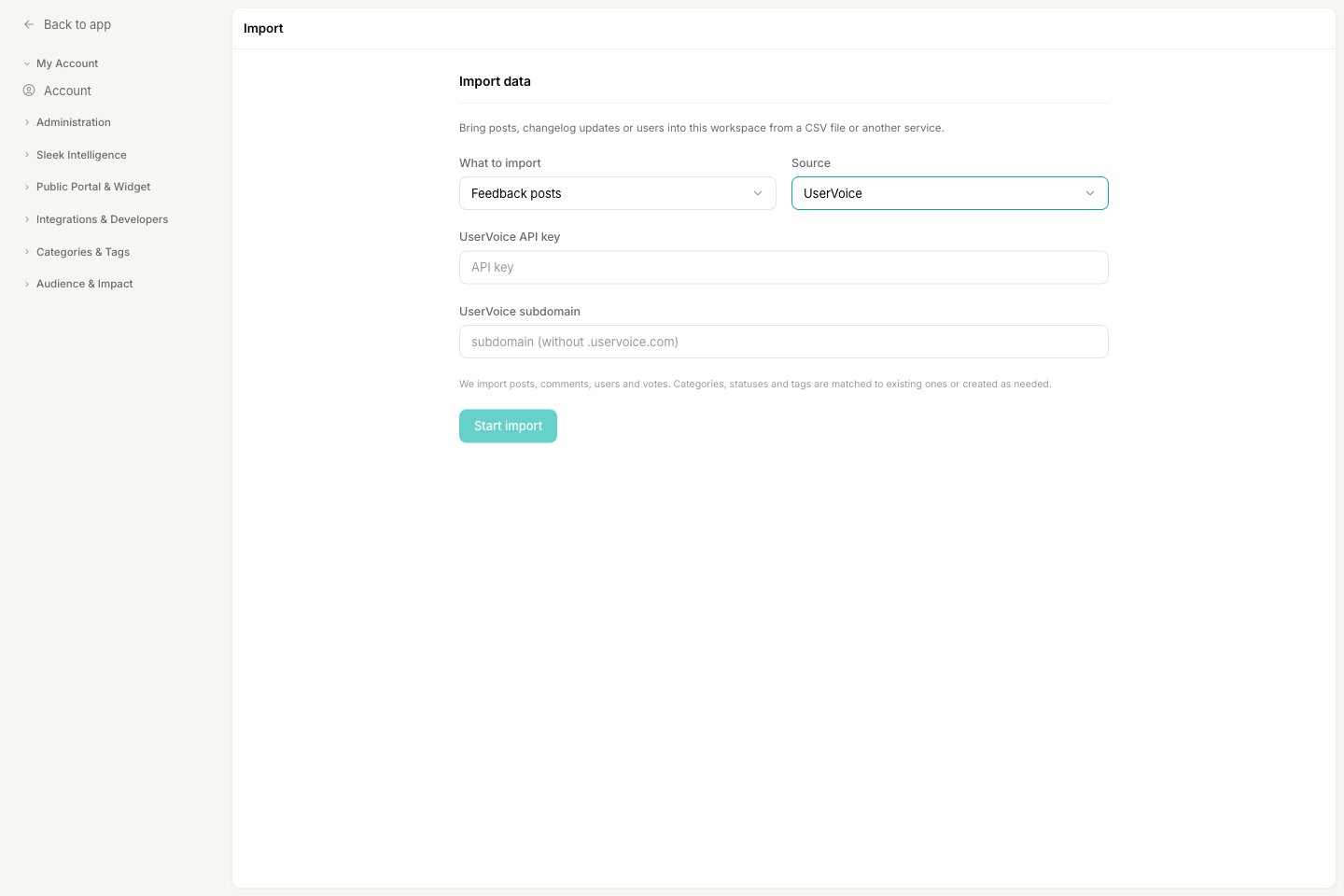
.uservoice.com).4
Start the import
Click Start import. Sleekplan schedules the job and works through your board in the background. Because it fetches every post, vote, and comment from the other tool, a large board can take a while. The workspace owner gets an email with a log when it’s done.
Related
Import from a CSV file
The way to import changelog updates and standalone user accounts.
How importing works
Permissions, background processing, and what to check before you import.