Start with the signal, not the noise
Your product ships weekly, but your users ship opinions daily. Customer feedback tools are the system that turns scattered comments into clear direction. For SaaS teams, the right stack tightens the loop from insight to release. Done well, it improves retention, roadmap clarity, and revenue quality.
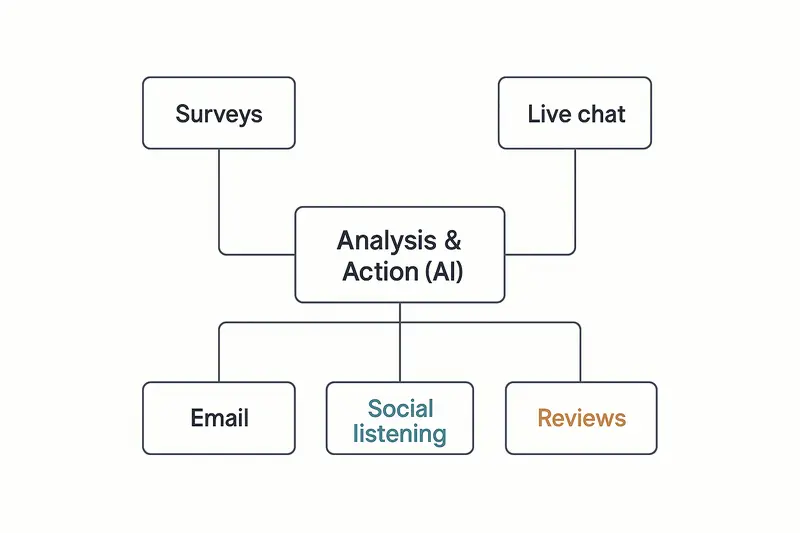
What customer feedback tools are, and why they matter
Customer feedback tools collect, organize, and analyze what customers say across surveys, in‑app prompts, chat, email, social, and reviews. They push beyond complaint handling into experience design. A clear definition and strategic framing can be found in SmartSurvey’s overview of customer feedback tools, a useful primer on scope and impact: https://www.smartsurvey.com/blog/customer-feedback-tools.
The principle: consistent listening creates compounding clarity. Small fixes add up, like reducing onboarding confusion or speeding up support handoffs. Over time, that compounding edge shows up in lower churn and cleaner product decisions.
A practical taxonomy of customer feedback tools
- Surveys: NPS, CSAT, CES, post‑event, and research studies. Strong for structured, comparable data.
- In‑app feedback: contextual prompts at key moments. High intent, high response rates.
- Live chat and messaging: real‑time conversations that surface urgent friction.
- Email feedback: longer‑form thoughts from customers who prefer async.
- Social listening: unsolicited sentiment and trend detection.
- Reviews and ratings: public proof, plus real qualitative detail.
- AI analysis layers: unify, tag, and score insights across channels.
Takeaway: combine methods. Each channel sees a different part of the truth.
Key selection criteria for customer feedback tools
- Customization: brand control, conditional logic, targeted follow‑ups.
- Automation: event triggers, lifecycle cadences, alerts, and routing.
- Integrations: CRM, product analytics, issue tracking, and chat.
- Reporting: segmentation, trends, and role‑based dashboards.
- Multichannel: web, app, email, social, reviews, support data.
Working rule: if insights cannot reach owners within minutes, they will not move the roadmap.
The SaaS feedback stack that actually works
A lean, durable setup looks like this:
- Surveys for relationship and transactional signals.
- In‑app feedback for context, right at the moment of delight or confusion.
- A central board where customers can suggest and upvote ideas.
- A public roadmap for clarity, and a changelog that shows progress.
- An AI layer that auto‑tags themes and sentiment, then routes next actions.
Where Sleekplan helps:
- Capture ideas and prioritize them in one place, with votes, comments and statuses on every request: feedback
- Turn signal into delivery with a transparent Roadmap: https://sleekplan.com/features/roadmap/
- Close the loop publicly with a clean, lightweight Changelog: https://sleekplan.com/features/changelog/
- Track loyalty and satisfaction with built‑in surveys: NPS and CSAT
Example rhythm:
- Post‑ticket CSAT within 1 hour of resolution.
- NPS quarterly to active users, segmented by plan.
- In‑app microsurveys when a user completes onboarding or tries a new feature.
- Changelog updates shipped weekly, bugfixes within 7 days.
Reflective note: fewer, well‑timed prompts beat a wall of popups.
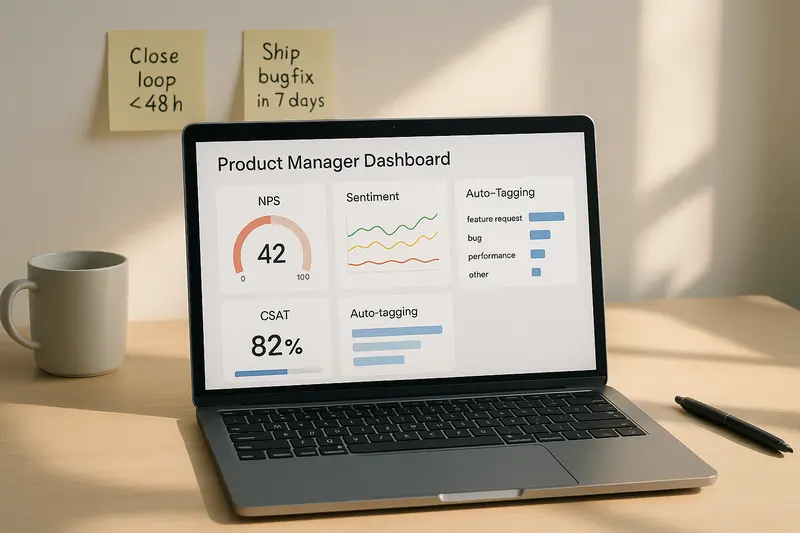
How AI reshapes customer feedback analysis
AI turns a mountain of comments into themes, sentiment, and suggested actions. Zendesk outlines how modern platforms ingest tickets, chats, and surveys, then score urgency and tone in real time: https://www.zendesk.com/blog/ai-customer-feedback/.
Useful truths:
- Sentiment has moved past positive or negative. Modern models detect frustration, confusion, or delight with practical accuracy, as covered by Glean’s research on AI for customer feedback cycles: https://www.glean.com/perspectives/ai-for-improving-customer-feedback-cycles.
- Auto‑tagging eliminates manual triage. Themes route to the right owner, fast.
- Predictive signals flag churn risk early, so success teams can act before renewal.
We use a simple test: can an analyst answer “What changed last week, by segment?” in under 2 minutes using dashboards and tags. If not, the stack is missing pieces.
Implementation playbook
Set goals first
- Decide what you will change: feature fit, onboarding clarity, support quality, or pricing confusion.
- Pick 3 metrics that tie to revenue or retention. Ignore the rest for 90 days.
Design your cadence
- Transactional: trigger within minutes of the event.
- Relationship: run on a regular pulse, then segment by plan, region, and role.
- Protect attention: one meaningful ask per user per month is a good guardrail.
Close the loop
- Acknowledge within 48 hours. Customergauge details the retention lift when teams close feedback fast: https://customergauge.com/blog/close-the-loop.
- Publicly mark what shipped in your changelog. Link back to the original request when you can.
- Internally, record the decision, owner, and due date. No orphaned insights.
Make it visible
- Post live feeds of detractor comments to the product team’s channel.
- Share weekly wins from promoters with engineering. Morale matters.
- Keep a one‑page summary for leadership that shows trend lines and actions taken.
Measuring ROI without hand‑waving
Tie inputs to outcomes. Start simple:
- Experience metrics: NPS, CSAT, CES by segment and time.
- Operational metrics: first response time, resolution time, reopen rate.
- Product metrics: activation, time‑to‑value, feature adoption, churn.
- Dollar metrics: retention, expansion, and lifetime value by cohort.
A clean habit: when a change ships, tag it to the feedback themes it addresses. Recheck the same metrics 30 and 90 days later. If nothing moves, adjust.
Common questions about customer feedback tools
- What are customer feedback tools? Software that captures and analyzes customer input across surveys, in‑app, chat, email, social, and reviews to guide product and experience decisions. See SmartSurvey’s concise definition: https://www.smartsurvey.com/blog/customer-feedback-tools.
- Which channels work best for SaaS? Combine in‑app prompts for context, post‑event surveys for speed, and a public board plus roadmap for transparency.
- How many tools do I need? Usually three to five, if they integrate well and share tags, IDs, and owners.
- How do I prevent survey fatigue? Ask fewer questions, at the right moments, and always close the loop with visible changes.
- Where should I start? Stand up NPS and post‑ticket CSAT, then add in‑app microsurveys and a public changelog.
Craft principles to keep
- Quality over volume. One sharp insight beats a thousand vague comments.
- Detail is leverage. Precise tags, clear owners, tight SLAs.
- Human judgment first. Let data inform, let people decide.
- Never ship half‑finished. Communicate, then deliver.
- Clarity scales. In design, in writing, in roadmaps.
Next step
If you want a compact, integrated way to collect ideas, prioritize with customers, publish a clear roadmap, and close the loop with a changelog, Sleekplan’s product stack does all four in one place. The board, the roadmap, the changelog and the score surveys share the same tags, owners and statuses, so nothing has to be re‑entered between them. The links above open each piece.