Most teams collect feedback. Few run a clean loop. Customer feedback management only creates value when it moves from collection to closure, quickly and cleanly. Below is a simple system we use and keep refining for SaaS.
Why customer feedback management breaks
- Fragmented channels, feedback lives in support, sales notes, Slack, and issues.
- No clear triage, so requests pile up and old ones win by default.
- Vague prioritization, everything feels important, nothing moves.
- No closure, customers speak into a void.
The fix is not more tools. It is a tighter loop and clear ownership.
The minimal feedback loop for SaaS
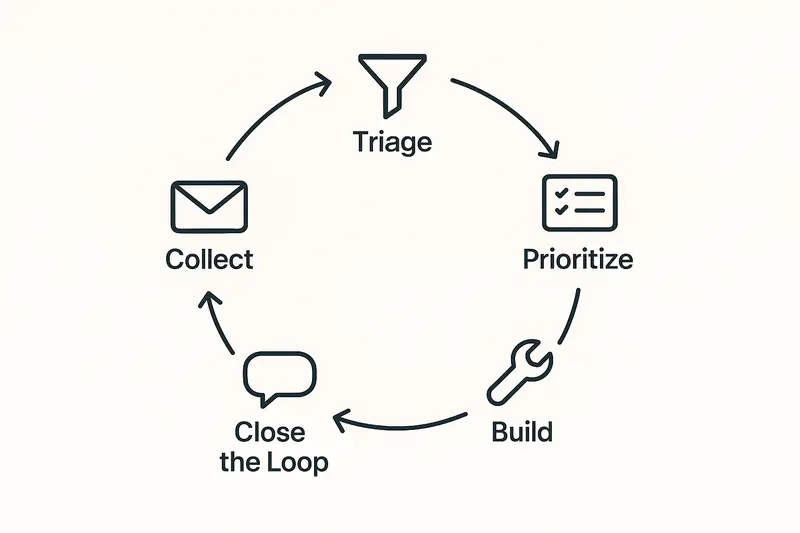
Five steps cover most cases: Collect, Triage, Prioritize, Build, Close the loop. Keep it small enough to run every week. Make it boring on purpose.
Principle: quality and craft beat speed. A fast loop that loses context still wastes time.
Collect: reduce noise at the door
- Unify sources: support forms, in‑app widget, sales notes, interviews. Route everything to one inbox.
- Ask for the essentials: problem, impact, frequency, environment, company size. Skip long forms.
- Tag at capture: product area, customer segment, pain vs gain. Do not overfit the taxonomy. Three to five tags is enough.
- Merge duplicates on sight. Keep one canonical record with voter counts and quotes.
Concrete example: we auto‑tag “Billing” from the subject, then confirm the product area during triage.
Triage: decide fast, daily
Triage is a 15 minute ritual. Read, tag, route. Do not solve here.
- Severity first: outages and security go straight to incident process.
- Eligibility: is this a bug, improvement, feature, or research? Label it.
- Fit: does it align to the current quarterly theme? If not, park it.
- Owner: assign a single name, not a team. Ownership clears ambiguity.
You want a steady cadence, not heroics. Small decisions add up.
Prioritize product feedback with impact vs effort
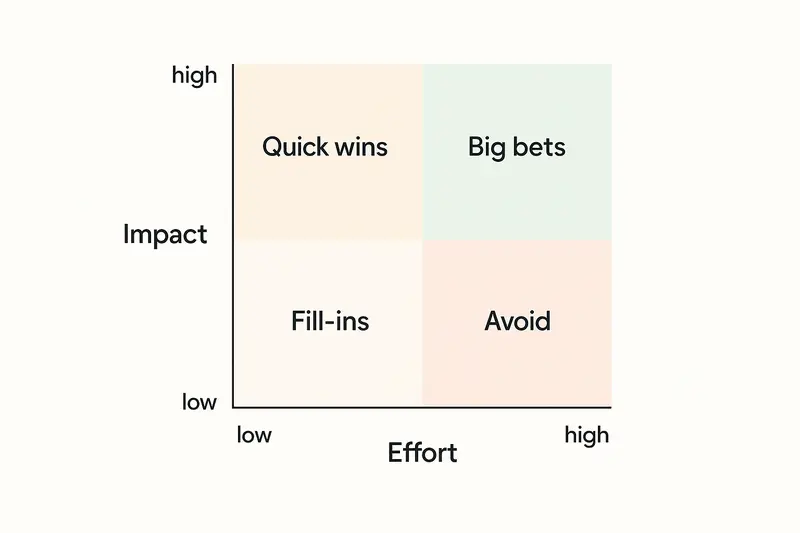
Most stacks overcomplicate prioritization. Start simple.
- Group by outcome: reliability, speed, adoption, expansion. Pick one north star for the cycle.
- Score impact: revenue at risk, number of affected accounts, frequency, qualitative pain. Use a 1 to 5 scale.
- Estimate effort: engineering days, design hours, risk. Keep it relative, not precise.
- Place items on the matrix: Quick wins, Big bets, Fill‑ins, Avoid.
If you need a model, RICE or ICE can help. The goal is a ranked list with no ties. The craft is in the judgment, not the formula.
Build with context, not just tickets
Shipping is smoother when the original feedback stays attached.
- Include the customer quote and the problem statement in the spec.
- Document acceptance criteria and edge cases, who is impacted, and why now.
- Link design decisions to the original pain. Future you will thank you.
A good sign: when engineers can reply to the customer with confidence, without asking the PM for translation.
Close the loop, every time
Silence kills trust. Closing the loop is the simplest retention play you have.
- Notify requesters when work starts, when it ships, and when you decline.
- Personalize the message. Name the problem you fixed, show a screenshot, add a short video if helpful.
- Offer alternatives when you say no, explain the tradeoff, and log the decision.
- Update a public changelog or roadmap so others can follow progress.
Set a team SLA: every item gets a path to closure within 30 days, even if the answer is not now.
Metrics that matter for feedback loops
Track a small set, review weekly.
- Time to triage, median under 24 hours.
- Time to first response, under 48 hours for non incidents.
- Time to decision, within 14 days for most requests.
- Percent closed with a reply, target 90 percent plus.
- Reopened items after ship, under 5 percent.
- Top three themes by volume and impact, clear and stable.
Metrics are a mirror. Use them to spot friction, not to police.
Tooling the loop without friction
You can run the first version with a spreadsheet and your issue tracker. When the volume grows, a dedicated system reduces manual work and keeps context tight. If you want an integrated way to collect, triage, prioritize, and close the loop, explore the feature set on the Sleekplan platform here: Sleekplan features.
We build for craft: clean capture, simple triage, clear prioritization, and respectful closure.
FAQ: customer feedback management
What is a customer feedback loop? A customer feedback loop is a system that collects input, turns it into decisions, ships changes, and notifies customers. The goal is learning and trust.
How do I prioritize feedback from enterprise and self serve users? Define segments. Score impact within each segment, then compare across segments with a clear strategy. Enterprise revenue at risk can outweigh volume from free users.
How often should we triage? Daily on business days. Fifteen minutes keeps the queue fresh and prevents pileups.
What should be public vs private? Make problems and decisions public when possible. Keep sensitive details, security, and customer data private.
How do we say no without losing goodwill? Describe the problem you heard, the tradeoff you made, and any workarounds. Offer to revisit if context changes.
A 30 day rollout plan
- Week 1: define tags, outcomes, and owners. Set the triage ritual.
- Week 2: connect sources, merge duplicates, and start the single queue.
- Week 3: run the first prioritization, ship two quick wins.
- Week 4: publish a changelog, close the loop on every shipped item.
Small, steady steps beat a big bang. Make the loop easy to run, then defend it. Over time, the quality of your decisions will show in your product and in the trust you earn.