The messy truth: raw feedback does not write code
Most teams drown in unstructured requests, then expect clean output from an AI. The trick is deliberate translation. We turn user feedback to Claude Code by writing a precise Claude Code prompt that preserves customer intent, adds structure, and sets firm boundaries.
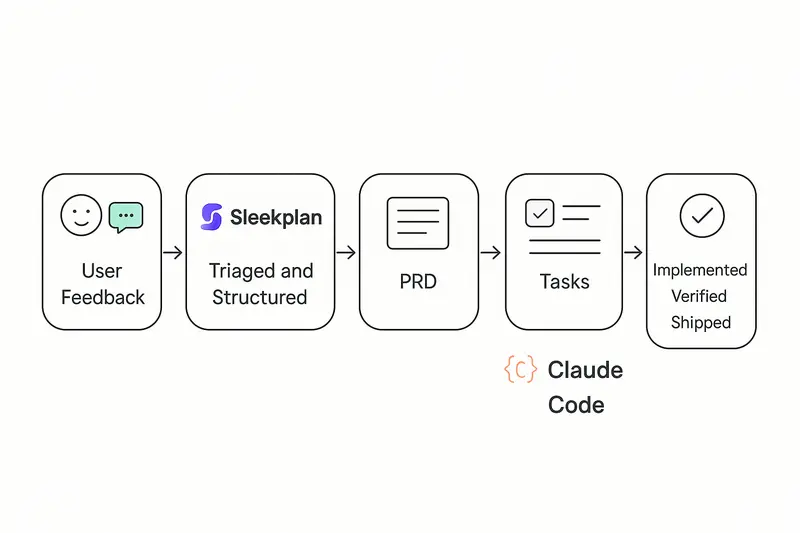
Build a feedback river, not a ticket swamp
High velocity starts upstream. Centralize signals and attach context at capture.
- Channels: in‑app widget, support, sales notes, interviews, NPS, analytics
- Structure: product area, segment, severity, ARR or tier, region
- Evidence: screenshots, logs, quotes
If you need a model for the ops side, read our breakdown of a scalable loop in Sleekplan’s blog on product ops feedback flow, then copy the cadence and tags that fit your org. See the framing here: How to build a bulletproof product ops feedback loop.
Useful building blocks inside Sleekplan:
- Capture and deduplicate with the Feedback Board
- Prioritize with impact scoring on the Public Roadmap
- Close the loop with a public Changelog
Takeaway: speed later depends on quality now. Treat intake like craft.
From feedback to a lean PRD
Skipping a PRD sounds fast, but clear specs make AI faster and safer. Good PRDs state the problem, the users, success metrics, and constraints in plain language. If you want a crisp primer on spec quality, Addy Osmani’s guidance on writing a good spec is a strong reference: Good specs for shipping software.
What we include before any prompt:
- Problem statement and who it affects
- Current and desired workflows
- Success signals: metrics and observable UI states
- Constraints: security, performance, a11y, test coverage
Principle: context before instructions. Let the spec set intent, then ask the AI to plan work.
Break big asks into verifiable slices
Claude is excellent at focused tasks and weak at “do everything at once.” Decompose work into small, reviewable units with explicit outcomes.
An example we like: improving language selection. The first attempt tried a full implementation in one pass and produced noisy code. The second pass split work into phases: research supported languages, design the selector entry point, implement minimal UI, add modal, polish and performance. That run shipped in roughly 4.5 hours with 18 tight iterations, as documented here: From feedback to production in 4 hours with Claude Code.
Checklist for good decomposition:
- Each step has a clear Definition of Done
- Unit or visual verification per step
- No step silently expands scope
- Dependencies are explicit
Takeaway: smaller slices, faster reviews, fewer surprises.
The three‑question Claude Code prompt framework
A reliable Claude Code prompt answers three things up front.
- What does done look like?
- Example: “Users see the language selector on first screen, 80 percent interact within 60 seconds, selection persists across sessions.”
- What context does Claude need?
- Stack and versions, architecture patterns, naming, error handling, tests, deployment.
- What constraints can’t it guess?
- Performance under 200 ms for open/close, WCAG 2.1 AA, 80 percent+ test coverage, GDPR compliance for stored prefs.
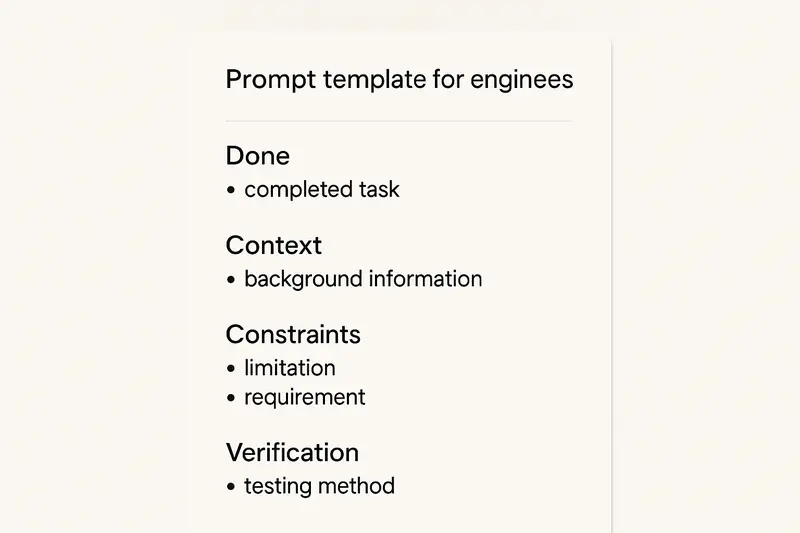
Here is a compact template you can adapt:
- Done: concrete behaviors and success metrics
- Context: stack, folder map, patterns to reuse, relevant files
- Constraints: performance, security, a11y, coding standards, tests
- Verification: how to check, what screenshots or tests to run
Pro tip: keep a CLAUDE.md in the repo with stable rules and references. Claude should read it first, then your task. See agent guidance in Claude’s best practices: Claude Code best practices.
Plan first, then implement
Use a plan step to separate exploration from edits. Ask Claude to:
- Read the codebase, outline an approach, list changed files
- Call out risks, ambiguities, and test points
- Propose a minimal slice to ship first
Approve the plan, then let it execute. A minute of planning saves ten minutes of refactor. The pattern aligns with the agent guidance above.
Verification inside the prompt
Tell Claude how to prove the work:
- Unit tests to run and thresholds to meet
- UI screenshots at key states for visual compare
- Manual steps to click, with expected results
Claude can report artifacts with each iteration. You review against evidence, not guesses.
Tie feedback to delivery systems
Keep customer context alive from board to PR.
- Push prioritized items from Sleekplan to Linear or GitHub using your preferred automation
- Include request counts, ARR impact, and top quotes in the ticket
- Ask Claude to echo this context in the PR description
For a simple pattern that auto‑creates GitHub issues from AI plans and links them through to PRs, see this write‑up: Automating GitHub issue creation with Claude Code.
Teams that wire context through the stack ship what customers actually asked for, not what the ticket title implied.
A concrete mini‑spec to show the level of detail
- Objective: Make language selection obvious and fast on first run
- Users: New and returning users on desktop and mobile
- Done:
- Entry point visible on main screen without scroll
- Alphabetical list of 15 supported languages
- Modal view for the full list, ESC to close
- Persist choice to app state and local storage
- Telemetry: impression, open, select, confirm
- Constraints: AA contrast, 200 ms open, unit tests for state logic, e2e test for persistence
- Verification: run tests, provide 3 screenshots (entry, modal, after select), post telemetry event IDs
This is the level of clarity that keeps iterations short and reviews clean.
Common pitfalls and how we avoid them
- Letting AI code set future patterns: require human acceptance on every PR
- Over‑ or under‑specifying: start broader, then tighten as the plan surfaces risks
- Context overload: summarize older chat turns to keep the current task clear
- Silent scope creep: freeze scope per slice, queue follow‑ups explicitly
Craft principle: human judgment owns acceptance and scope, AI accelerates execution.
A fast, repeatable workflow you can adopt
- Capture and structure feedback in Sleekplan, then prioritize with the Roadmap impact score
- Draft a lean PRD and spec, sanity‑check with Addy Osmani’s spec criteria above
- Ask Claude to plan, not code, then confirm the smallest shippable slice
- Write a tight Claude Code prompt with Done, Context, Constraints, Verification
- Ship in short loops, verify with tests and screenshots, announce in your Changelog
- Document steady rules in your repo and point folks to Sleekplan Developer Docs
Quick FAQ
- How do I move from a vague idea to a Claude Code prompt? Start with a one‑page PRD that states problem, users, desired behaviors, and constraints, then convert each behavior into a small, verifiable task.
- How many steps per session? Aim for 1 to 3 changesets that you can review in under 30 minutes each.
- What if Claude proposes 40 subtasks? Re‑scope. Your slice is too big or under‑defined. Merge tasks only where verification remains obvious.
- Where can I learn the iteration rhythm? Study this case study of 18 focused iterations in 4.5 hours: From feedback to production in 4 hours.
Why this works
Teams that master this flow report tighter alignment to customer needs, fewer rewrites, and faster cycle time. Not because they move recklessly, but because they respect the craft: structure the signal, write a thoughtful Claude Code prompt, plan before edits, verify at each step, and keep the customer thread visible from intake to release.