The shift to skills-built surveys
AI Coding Assistant Survey Creator skill usage is changing how teams capture feedback. Instead of hand-crafting forms, product managers describe intent, and Claude or ChatGPT turns it into a validated survey, branching logic, and a spec you can ship.
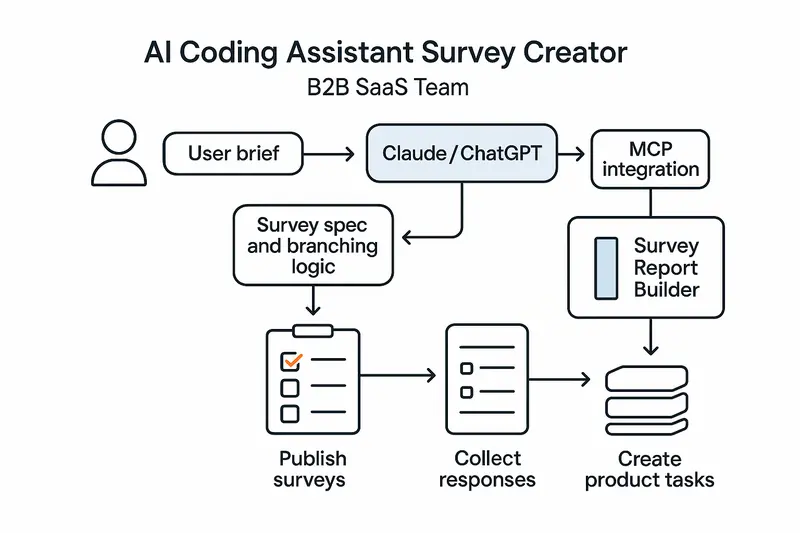
Speed is only half the story. The real win is consistency. Skills encode method, so every survey follows the same high bar, not the whim of whoever wrote the last prompt.
From prompting to repeatable Claude skills
Traditional prompting is a one-off. Skills are a system. Anthropic’s model formalizes this with frontmatter, triggers, and step-by-step instructions you can test and version. See the full overview in Anthropic’s guide to building skills for Claude: https://resources.anthropic.com/hubfs/The-Complete-Guide-to-Building-Skill-for-Claude.pdf.
Principle: put the workflow in the skill, not in a human’s memory.
Inside the Survey Creator skill
The Survey Creator skill activates on natural language, then moves through a defined flow:
- Clarify objectives, audience, constraints, and success criteria.
- Propose question pool, types, and scales mapped to objectives.
- Design order, branching rules, and survey length targets.
- Run validation checks for clarity, bias, double-barrels, and scale balance.
- Output a production-ready spec and config.
For a reference implementation, explore the Survey Creator listing: https://awesomeskill.ai/skill/claude-code-plugins-plus-skills-survey-creator. For wording and scale guidance, lean on established survey best practices from Qualtrics: https://www.qualtrics.com/articles/strategy-research/how-to-create-a-survey/.
The SKILL.md blueprint
A good skill reads like a standard operating procedure. Frontmatter sets name, description, and triggers. Instructions define the flow and checks. Keep scope tight and test for false triggers.
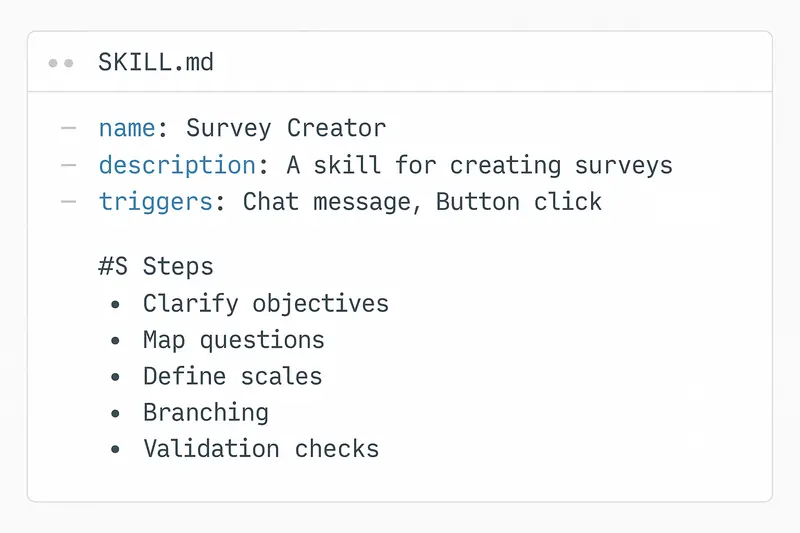
Design choices that matter:
- Triggers: specific enough to avoid noise, broad enough to catch real intent.
- Validation: explicit checks for wording, bias, and mutually exclusive options.
- Outputs: consistent schema for import into your stack.
Takeaway: precision in the blueprint yields precision in the survey.
From spec to live: MCP, plugins, and automation
Skills define what to do, MCP connectors define where to do it. In practice, Claude uses the Survey Creator skill to compose a spec, then an MCP or plugin creates and publishes the live survey. This keeps conversation, creation, and deployment in one flow.
Why it works:
- One brief, one interface.
- No handoffs into fragile copy-paste.
- Versioned artifacts you can review in code.
Analysis on autopilot with Survey Report Builder
Creation is step one. Step two is turning CSVs into decisions. The Survey Report Builder skill automates import, variable typing, visuals, and theme extraction into Quarto or slide-ready outputs: https://mcpmarket.com/tools/skills/survey-report-builder.
What you get:
- Charts for scales and categories, cross-tabs for segments.
- Thematic summaries with representative quotes.
- Exports you can share the same day.
Principle: automate the boring parts, keep human judgment for interpretation.
Best practices we actually use
Human judgment beats pure automation. We pair skills with review and pilots.
- Set the brief: decision to inform, target respondents, constraints, success metric. Be explicit. Example: mobile-first, under 3 minutes, include NPS and 2 follow-ups.
- Build with standards: wording guides, scale libraries, naming conventions.
- Validate ruthlessly: run the skill’s checks, then expert review, then a pilot with 10 to 20 users.
- Close the loop: define actions before launch. Low CSAT creates a ticket within an hour, feature requests move to backlog grooming weekly.
For ethical and methodological guardrails, follow AAPOR’s AI guidance: https://aapor.org/newsletters/best-practices-for-using-generative-ai-for-survey-research/.
Product workflows that ship value
Here is a pattern we see outperform ad-hoc surveys.
- Idea to spec
- PM types: “Create a post-onboarding satisfaction survey for SMB trials. Three-minute cap, NPS primary, mobile-first.”
- Skill returns a validated spec with 8 to 12 questions, balanced scales, and logic for trial conversion paths.
- Publish and collect
- MCP pushes to your survey host and returns a link. Email goes to the advisory cohort within the hour.
- Analyze and act
- Survey Report Builder produces slides by end of day. Low scores on setup speed auto-create an engineering ticket. NPS detractors get CS outreach.
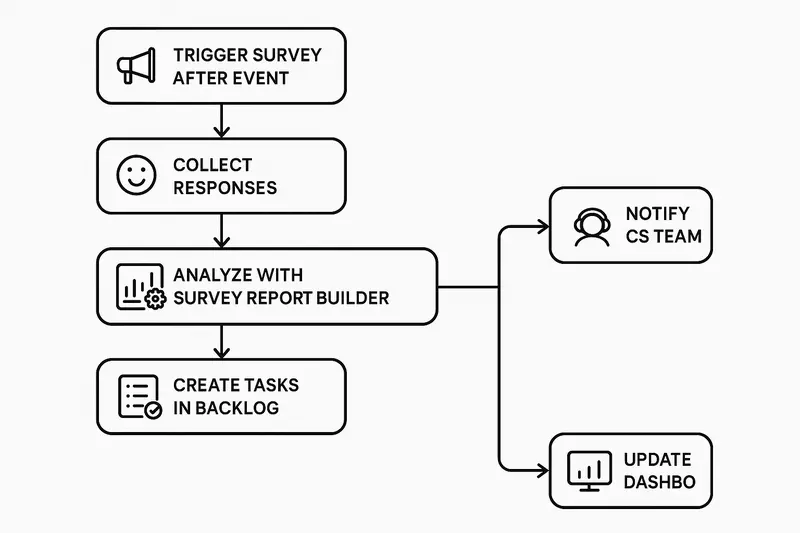
Want the same loop around your roadmap and changelogs, not just surveys? See how Sleekplan Intelligence routes insights into action: https://sleekplan.com/intelligence/.
Claude, ChatGPT, and the Coding Assistant stack
Both Claude and ChatGPT can serve as your AI Coding Assistant. The key is not the logo, it is the skill pattern: encode repeatable steps, constrain triggers, and validate outputs. With that in place, either model can:
- Turn a brief into a survey spec with branching.
- Enforce wording and scale standards.
- Export configs your tooling can import.
- Summarize open-ended responses into themes.
Quick start checklist
- Define objectives, audience, and a 3-minute target length.
- Draft SKILL.md with triggers like “create survey,” “CSAT,” “post-onboarding.”
- Add validation steps for bias, double-barrels, exclusivity, and length.
- Create reference docs: approved scales, wording patterns, example surveys.
- Pilot with 10 to 20 users, fix issues, then launch at scale.
- Wire closed-loop automations for low scores and critical themes.
FAQ
-
What is a Survey Creator skill? A reusable instruction set that lets an AI assistant generate, validate, and export production-ready surveys from a plain-language brief.
-
How is this different from traditional survey tools? You design by conversation and code spec instead of drag-and-drop. It is faster and more consistent, then you publish via integrations or import into your platform of choice.
-
How do I ensure quality? Pair the skill’s automated checks with expert review and a short pilot. Use established standards for wording and scales, such as the Qualtrics guidance: https://www.qualtrics.com/articles/strategy-research/how-to-create-a-survey/.
-
Does this replace researchers? No. It removes busywork so researchers focus on objectives, sampling, interpretation, and decisions.
Closing thought
Fast is good, but craft is better. Encode the craft once in a Survey Creator skill, then ship every survey with the same clarity. The result is less rework, cleaner data, and faster, calmer decisions.