A user story template you can copy, with the acceptance criteria already filled in.
Classic story
Classic story
The Connextra form, the default for most backlog items: one sentence of intent, then a checklist of rules that decide when it is done.
The template
As a [role], I want [goal], so that [benefit].
Acceptance criteria
- [The rule the system follows when the main case succeeds.]
- [The limit, count or timeout that applies.]
- [What the user sees when the input is invalid.]
Worked example: bulk workspace invites
As an IT administrator rolling the tool out to a department of 200 people, I want to invite teammates from a CSV file, so that I do not paste addresses one at a time.
Acceptance criteria
- The upload accepts a CSV of up to 1000 rows and a file size up to 5 MB.
- Required columns are email and role. A file missing either column is rejected before a single invite is sent.
- Rows with a malformed email address are skipped and listed by row number, and the valid rows are still sent.
- An address that already belongs to the workspace is counted as skipped, never invited twice.
- The summary shows sent, skipped and failed counts within 10 seconds for a file of 1000 rows.
Given / When / Then
Given / When / Then
The same story sentence, with each criterion written as a scenario in Gherkin, the syntax test runners like Cucumber read directly. Use it when the behaviour depends on state.
The template
As a [role], I want [goal], so that [benefit].
Scenarios
Scenario: [name of the happy path]
Given [the starting state]
When [the action]
Then [the observable result]
Scenario: [name of the failure path]
Given [the starting state]
When [the action cannot complete]
Then [what the user gets instead]
Worked example: scheduled weekly report
As a regional operations manager, I want the Monday performance report emailed to my distribution list automatically, so that I stop rebuilding it by hand every week.
Scenarios
Scenario: The report sends on schedule
Given a schedule set to Monday 07:00 in the recipient timezone
And a distribution list of 12 addresses
When the scheduler runs
Then all 12 recipients receive the PDF within 5 minutes
And the report covers the 7 days ending the previous Sunday
Scenario: The data source is unavailable
Given the warehouse query returns an error
When the scheduler runs
Then no partial report is sent to anyone on the list
And the report owner receives a failure notice within 15 minutes
And the job retries twice at 30 minute intervals before it gives up
Rule checklist
Rule checklist
Criteria written as flat statements that are each either true or false. Use it for work that is a set of constraints rather than a flow.
The template
As a [role], I want [goal], so that [benefit].
Acceptance criteria
- [A limit, stated as a number with its unit.]
- [An allowed set, listed in full.]
- [What the user sees when a rule is broken.]
Write each rule so it can only be read one way
Vague: the file should not be too large.
Precise: a file over 25 MB is rejected and the reason names the 25 MB limit.
Worked example: ticket attachments
As a support engineer, I want to attach screenshots and log files to a ticket, so that the developer can reproduce the problem without a second round of questions.
Acceptance criteria
- A ticket accepts up to 10 attachments totalling 50 MB.
- Accepted types are png, jpg, pdf, txt, log and zip. Every other extension is refused.
- A refused file shows its name and the reason inline, and the other files selected with it still upload.
- Attachments are scanned before they become visible, and a file that fails the scan is removed and reported within 60 seconds.
- An attachment download link expires 24 hours after it is generated.
Job story
Job story
When, I want, so I can. Choose it over the classic form during discovery: it leads with the situation rather than a persona, so you do not have to invent a user you have not met yet.
The template
When [situation], I want [motivation], so I can [expected outcome].
Acceptance criteria
- [What is preserved, and for how long.]
- [How much work can be lost at worst.]
- [What happens when the state cannot be restored.]
Worked example: returning to a draft
When I open the app the next morning after being pulled away in the middle of a sentence, I want to land back in the draft I was writing, so I can keep going without hunting through a file list.
Acceptance criteria
- Reopening the app within 30 days restores the last edited draft, with the cursor at the last edit position.
- The draft is saved at most 3 seconds after the last keystroke, so no more than 3 seconds of typing can be lost.
- A banner names the draft and its last edit time, and one click dismisses it for that device.
- If the draft was deleted or edited elsewhere, the app opens the document list and says which of the two happened.
Bug report
Bug report
A defect is not a story. Record what you did, what you expected, what happened and where. The acceptance criteria say what counts as fixed.
The template
Summary: [one sentence of observable behaviour, no diagnosis]
Steps to reproduce
- [Step 1]
- [Step 2]
- [Step 3]
Expected
[What should have happened]
Actual
[What happened instead]
Environment
[App version, device, OS, account settings, region]
Worked example: notification shows the wrong local time
Summary: A push notification for a 15:00 meeting reads 09:00 while the recipient is travelling outside their home timezone.
Steps to reproduce
- Set the account timezone to Europe/Berlin and schedule a reminder for 15:00.
- Change the device timezone to America/New_York and close the app.
- Wait for the reminder to fire.
Expected
The notification reads 15:00 Berlin time, the timezone the event was created in.
Actual
The notification reads 09:00, the device local time, with no timezone label.
Environment
iOS 18.4, app 4.12.0, device timezone America/New_York, account timezone Europe/Berlin.
Acceptance criteria
- Notification times render in the event timezone and name it, in all 5 supported languages.
- Changing the device timezone updates scheduled but undelivered notifications within 1 minute.
- Events spanning a daylight saving change keep their wall clock time, verified for both the March and October transitions.
What a user story is, and what the acceptance criteria add
A user story names who wants something, what they want, and why. The classic form is one sentence: as a role, I want a goal, so that a benefit. It is deliberately short, because its job is to hold a place for a conversation rather than to replace one.
The acceptance criteria are what make the story testable. They state, as a list of things that are either true or false when the work is done, what the team agreed the story means. A story without them is an intention; a story with them is a shared definition of done that a reviewer can check without asking the author what they meant.
The difference between the two is a division of labour, not a difference in importance. The story holds the intent and stays negotiable: it is written to be argued with. The criteria record what the argument concluded, and they stop being negotiable once the work starts. If you find yourself adding detail to the story sentence, you are almost always writing a criterion in the wrong place.
The two common formats for criteria are Given/When/Then, which describes behaviour as scenarios, and a rule checklist, which lists constraints. Scenarios suit anything with a flow. A checklist suits anything with rules, like validation or permissions. Three to five criteria per story is typical; a story that needs twelve is usually two stories.
Which user story format to use when
Pick the format by what the criteria have to describe, not by what the team calls itself. A scrum user story template and an agile user story template are the same artifact: the Connextra sentence plus criteria. What actually changes between backlog items is whether the behaviour branches, and that is what the five tabs above differ on.
If the behaviour depends on state, write Given/When/Then, because whoever automates the test will otherwise write it for you and guess. If the work is a set of constraints, a rule checklist reads faster and is easier to review line by line. If you are still in discovery and do not know who the user is yet, a job story lets you write the situation down without inventing a persona to hang it on.
One rule holds across all five: copy the format, then fill it in before you share it. An empty skeleton pasted into a ticket is worth less than no ticket, because it looks like a decision was made.
| Format | Criteria style | Audience | Use it when |
|---|---|---|---|
| Classic story | Rule checklist | The whole team, in backlog refinement | The feature is understood and you need it written down |
| Given / When / Then | BDD scenarios | QA and automation engineers | The behaviour branches and someone will write tests from it |
| Rule checklist | Numbered constraints | Designers and reviewers | The work is a set of rules rather than a flow |
| Job story | Situation-led criteria | Discovery and research-driven teams | You do not know the persona yet and the situation is the real driver |
| Bug report | Expected versus actual | Support and engineering | Something already exists and is wrong |
User story examples with acceptance criteria you can copy
Below are sixteen user stories drawn from eight parts of a product, two from each, with the acceptance criteria written out beside every one. Each story carries between three and five criteria, and every criterion names a number, an exact state or an exact action, so a tester can pass or fail it without asking what was meant. Copy them as they are, then swap the role and the numbers for your own.
Onboarding. As an IT administrator standing up a workspace for 240 staff across 6 sites, I want a setup checklist that shows which of the 7 required steps are still open, so that I hand over a workspace that is configured rather than one that looks configured. Done when: the checklist lists all 7 steps, each marked done or not done; every open step links straight to the screen that completes it; the workspace cannot be switched to live while any required step is open; completing a step updates the checklist without a page reload; the audit log records who completed each step and when.
Onboarding. As a newly hired claims adjuster working my first 20 cases, I want the 8 steps of the claim workflow shown on the case itself, so that I stop asking a colleague what comes next. Done when: each case displays the 8 steps with the completed ones marked; the case header names the next step by its exact title; skipping a step requires choosing a reason from the list before the case can move on; the checklist switches itself off after the adjuster closes 25 cases and can be switched back on from their profile.
Billing. As a finance manager closing the month for 12 legal entities, I want to download one consolidated invoice per entity rather than per subscription, so that I can file them without merging PDFs by hand. Done when: each entity produces exactly one PDF covering every subscription billed in that period; the file name carries the entity name and the billing month; entities with no charges produce no file rather than an empty one; the download completes for 12 entities in a single request.
Billing. As the office manager of a dental practice with 18 seats, I want to add 4 seats halfway through a billing period and see the prorated amount before I confirm, so that I am not surprised by the next invoice. Done when: the prorated amount is shown before confirmation and matches the amount charged to the cent; all 4 seats are usable immediately after confirmation; the next invoice carries the proration as its own line with the date range it covers; an attempt to reduce the seat count below the number of seats in use is refused, and the message states how many seats must be freed first.
Search and filtering. As a recruiter working a pipeline of 12,000 candidate profiles, I want to search by skill and by last-contacted date in the same query, so that I stop exporting to a spreadsheet to combine them. Done when: results satisfy both conditions at once, not either one; a name misspelled by a single character still returns the matching profile; archived profiles are excluded unless the recruiter includes them explicitly; the result count is exact up to 10,000 and shown as "10,000+" above that; a query with no results names both active conditions and offers to drop one.
Search and filtering. As a logistics dispatcher who rebuilds the same view of late shipments every morning, I want to save that filter under a name and open it from the sidebar, so that I stop setting 6 conditions by hand each day. Done when: the saved filter stores all 6 conditions, including relative dates such as "today"; opening it runs the query against current data rather than showing the result set from last time; a filter shared with the team is read only for everyone except its owner, who can be seen by name; deleting a filter that 3 other people have opened in the last 30 days warns with that count before it is removed.
Notifications. As a school administrator copied on every facilities request across 4 campuses, I want one daily digest instead of a message per request, so that I read 1 email in the morning rather than 60 through the day. Done when: the digest sends once per day at the hour the administrator selects; requests are grouped under the campus they came from; a day with no new requests sends nothing at all; each line shows the request title and its current status and links to the request; switching from daily to weekly takes effect at the next send and carries over the items already queued.
Notifications. As an account manager copied on a renewal thread that has run to 40 replies, I want to mute that one thread without muting the account, so that I keep my alerts for the other 22 accounts I own. Done when: muting silences that thread only, and notifications for the other 22 accounts continue; a direct mention inside the muted thread still notifies once; the muted marker is visible to the person who muted it and to nobody else; unmuting resumes notifications from that point and does not replay the messages posted while it was muted.
Admin and permissions. As a compliance officer at a credit union, I want an auditor role that can open every case record and change none of them, so that an external reviewer can work without a supervised screen share. Done when: an account holding the auditor role can open all 9 record types and sees no save, delete or assign control anywhere; an API token issued to that role is refused with a 403 on every write endpoint; the role can still export records to CSV; granting the role requires an existing administrator and writes both names and a timestamp to the audit log.
Admin and permissions. As an HR operations coordinator processing 15 leavers a month, I want a single action that revokes a departing employee's access while keeping the records they created, so that offboarding does not erase four years of history. Done when: revoking access ends every active session for that account within 60 seconds; the leaver's name stays on the records they created and is shown as inactive; any open tasks assigned to them are listed for reassignment before the revocation finishes; a revoked account cannot be reactivated except by an administrator, and the reactivation is logged.
Reporting. As a data analyst pulling 18 months of ticket history into a warehouse, I want an export that returns every matching row rather than the 1,000 shown on screen, so that my totals reconcile with the product. Done when: the export contains all matching rows, verified against a query returning 250,000; column headers match the field names used by the API; timestamps are written in ISO 8601 with the UTC offset; an export above 100,000 rows is prepared in the background and the analyst is told where to collect it; an export that fails reports the row number it stopped at.
Reporting. As a nonprofit program director presenting to a board of 7 trustees, I want a dashboard of 4 numbers that each state the period they cover, so that nobody spends the meeting asking what the figure means. Done when: each of the 4 numbers displays its date range next to it; clicking a number opens the list of records it was calculated from; the page shows the time of the last refresh and that time is never more than 1 hour old; a metric with no underlying records reads "no data for this period" instead of 0.
Integrations. As a marketing operations manager who inherited a second CRM through an acquisition, I want both systems connected at once rather than one replacing the other, so that neither team loses their pipeline during the merge. Done when: both connections remain active at the same time and each displays the account it authenticates as; every imported record is tagged with the system it came from; a field written by one connection is not overwritten by the other, and the clash is listed for a human to resolve; disconnecting one system leaves the records already imported from it in place.
Integrations. As a payroll specialist running a nightly sync of 1,400 employee records, I want a run that fails partway to tell me exactly what did not land, so that I fix 12 records instead of rerunning all 1,400. Done when: the run reports counts for records written, skipped and failed; each failed record is listed with its employee identifier and the reason it failed; rerunning the sync processes only the failed records; one alert is sent for the run, not one per failed record; a record either updates on every field or on none, never on some.
Mobile. As a field technician writing job notes at the top of a ladder with one hand, I want every control I need inside the bottom third of the screen, so that I am not stretching my thumb across the display on a rung. Done when: the controls required to complete a job sit in the bottom third at screen widths from 360 to 430 points; notes persist as typed and survive the app sitting in the background for 30 minutes; a job can be closed in 3 taps from the job screen; a quantity field opens the numeric keypad rather than the full keyboard.
Mobile. As a warehouse supervisor counting stock in a freezer aisle with no signal, I want counts saved on the device and uploaded later, so that a lost connection does not cost me a 2 hour count. Done when: counts entered offline are stored on the device and shown as pending; the count screen states how many entries are waiting to upload; entries upload on their own when the connection returns and change from pending to saved; two supervisors counting the same location offline produce two entries, both kept and flagged, with neither overwriting the other; the device holds at least 500 pending entries before it refuses a new one.
INVEST: the six-part check on a story before it enters a sprint
INVEST is a checklist coined by Bill Wake in 2003, and it is still the shortest useful test of a user story: Independent, Negotiable, Valuable, Estimable, Small, Testable. Read the story once against each letter. A story that fails one of the six is not a bad story, it is a story that needs one more conversation before anyone estimates it.
Independent means it could ship without waiting on another story. Negotiable means it leaves room to discuss how, so a story that names a dropdown and a database column is a solution wearing a story's clothes. Valuable means the person in the sentence would notice if it shipped. Estimable means the team knows enough to size it. Small means it fits comfortably inside one sprint. Testable means every criterion can be checked without asking the author what they meant.
Two of the six fail far more often than the rest. Small fails because a story was written at the size of a feature, and the fix is to split it along the acceptance criteria you already wrote: each criterion that could be released on its own is a candidate story. Testable fails because the criteria carry adjectives instead of numbers, and the fix is mechanical, which is why the builder on this page flags them.
INVEST is a prompt, not a gate. Nobody should be blocked on Negotiable. The value is that six words catch, in about thirty seconds, the two failures that otherwise surface halfway through a sprint.
The part a template cannot fill in: who actually asked
A template gives you the shape of a story. It cannot tell you whether anybody wants it. The sentence "as a support lead, I want to filter the board by plan" is well formed whether it came from 30 customers or from one person in a planning meeting, and the format hides the difference completely.
That is why the first line of a good story names a real person at a real scale. A role written as "a support lead triaging 200 tickets a week" is falsifiable: either you have that person or you do not. A role written as "a user" is not, and it is how backlogs fill with work that nobody asked for and nobody misses.
The practical obstacle is that the evidence is scattered. It sits in support tickets, in sales-call notes, in a Slack channel somebody muted, and in a survey export nobody reopened. Most teams write the story from memory because reconstructing where the request came from costs an afternoon, not because they think the provenance does not matter.
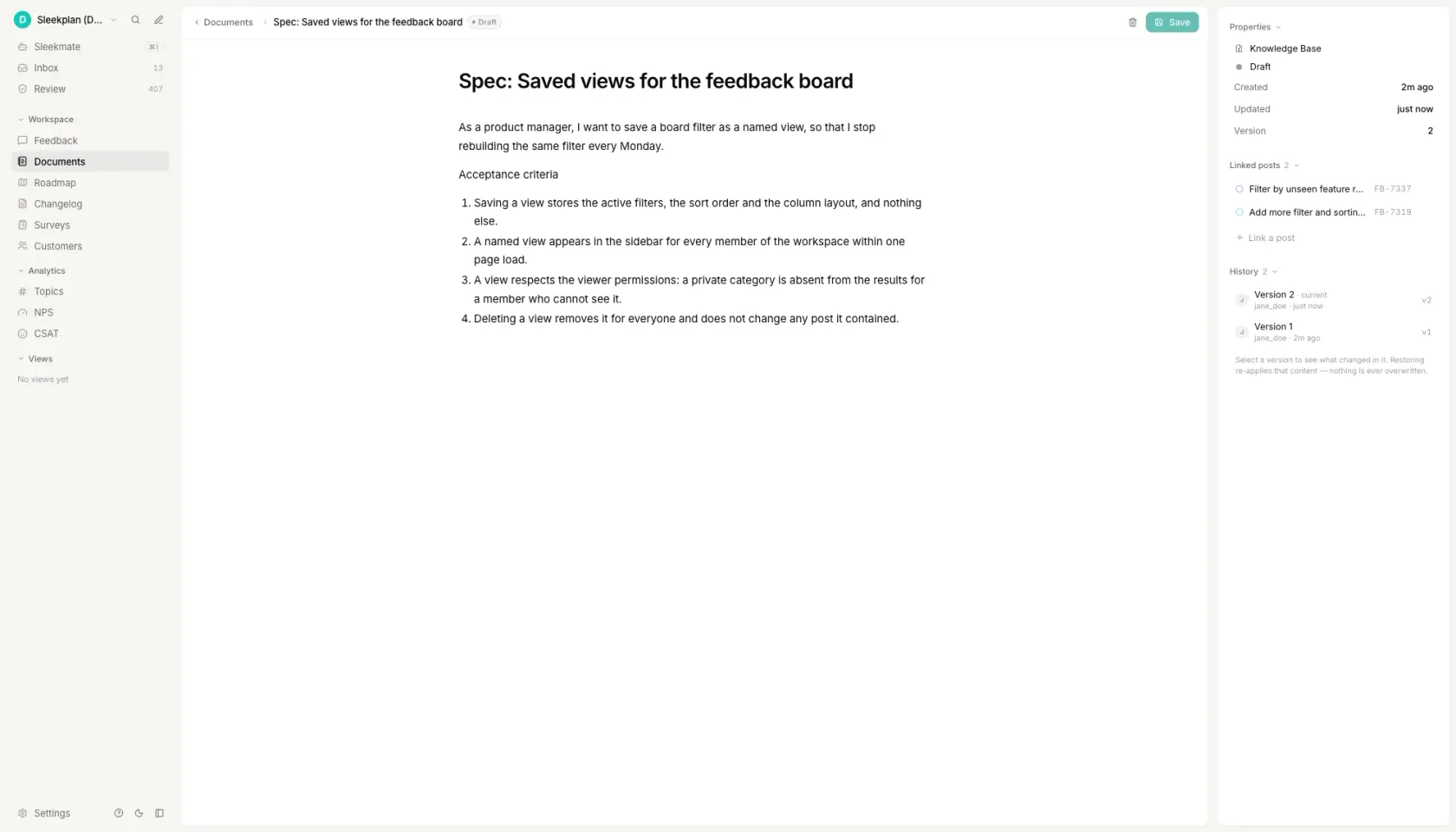
That is the step Sleekplan removes. Requests arrive from the widget, the portal and your support tools onto one board, where they are voted on and grouped. The story is written as a document in the same workspace, linked to every request it came from, so a reviewer can click from the acceptance criteria back to the person who asked and read what they actually said.
How to write user stories
Name one real person, not the user
Write the role as a job plus a scale: a support lead triaging 200 tickets a week, a payroll specialist running a nightly sync of 1,400 records. "As a user" passes every review and tells nobody anything, and it is the single most common reason a story gets built for a person who does not exist. If you cannot name the role specifically enough that someone could go and find that person, you have a feature idea, not a story.
Write the goal as an action, not a screen
The goal belongs in the user's language and at the level of outcome: "filter the board by the plan a request came from", not "add a dropdown to the board header". A goal written as an interface element has already decided the design, which means the story is no longer negotiable and half the team's expertise is locked out of the conversation before it starts.
Make the benefit falsifiable
The "so that" clause is the part a reviewer uses to decide whether the proposed solution actually delivers anything, so it has to be something that could turn out to be false. "So that the experience is better" cannot be wrong, which means it also cannot be right. "So that I can tell a trial request from a paying one before I escalate it" can be checked against the person in the story in about a minute.
Turn the benefit into acceptance criteria
Ask what would have to be true for that benefit to land, and write each answer as a statement that is either true or false when the work is done. Three to five is typical. Cover the main case, the limit that applies, and the one failure everybody will otherwise discover in review. If the behaviour branches, write them as Given/When/Then scenarios instead, because whoever automates the test will otherwise guess.
Delete every vague word
Read the criteria back and strike out fast, easy, intuitive, user-friendly, seamless and robust. Each one is a place where two people will read the same sentence differently and only find out during review. Replace it with a number or an exact action: "loads quickly" becomes "renders 50 rows in under 2 seconds". Then check the phrasing is positive, because a criterion written as "should not" describes an infinite set of behaviours and tests none of them.
Questions people ask
What is the format for a user story?
As a role, I want a goal, so that a benefit. All three parts matter: the role stops the story being written for a generic user, the goal states the outcome rather than the implementation, and the benefit is the part a reviewer uses to decide whether the proposed solution actually delivers it. The format is called the Connextra template, after the company whose team wrote it down in 2001.
What are the 3 C's of user stories?
Card, Conversation, Confirmation, from Ron Jeffries in 2001. The card is the story sentence, short enough that it was originally written on an index card. The conversation is the discussion the card exists to trigger, and it is where the real requirement is worked out. The confirmation is the acceptance criteria: what the two sides agreed, written down so it can be checked later.
What is considered a good user story?
One that names a specific person rather than "a user", states an outcome rather than an interface element, carries a benefit that could turn out to be false, and comes with three to five acceptance criteria containing numbers instead of adjectives. The usual shorthand for the rest is INVEST: independent, negotiable, valuable, estimable, small and testable. Small and testable are the two that fail most often.
How do I write acceptance criteria for a user story?
Ask what would have to be true for the story's benefit to land, and write each answer as a statement that is either true or false when the work is done, with no adjectives. Two formats are common: Given/When/Then scenarios for anything whose behaviour branches, and a rule checklist for anything that is a set of constraints such as validation or permissions. Three to five criteria per story is typical.
Can you provide an example of an acceptance criteria in a user story?
Take the story "as an IT administrator rolling the tool out to a department of 200 people, I want to invite teammates from a CSV file, so that I do not paste addresses one at a time." One criterion on it reads: "rows with a malformed email address are skipped and listed by row number, and the valid rows are still sent." It is checkable, it names the failure case, and nobody has to ask the author what they meant.
Your roadmap,
on autopilot.
Free for 30 days. No card, no sales call. Cancel anytime.