Five release notes templates you can copy, each with a worked example.
Product release note
[Acme Analytics] 2.4.0
Released [2 October 2026] · For every workspace
What is new
- Saved views. Filter a dashboard once, name it, and it is waiting for you tomorrow. A view is private until you share it with the workspace.
- CSV export on every table, up to 50,000 rows. Anything larger arrives by email as a zip file.
- A weekly summary email, off by default. Turn it on under Settings, Notifications.
Improved
- Dashboards with more than 20 widgets load in about 1.2 seconds, down from 4.1.
- The date picker remembers the last range you used on each dashboard instead of resetting to Last 7 days.
- The workspace switcher is searchable once you belong to more than five workspaces.
Fixed
- Scheduled reports were sent in UTC rather than in the workspace timezone. [37] workspaces were affected and their send times are correct from today.
- Deleting a widget while its query was still running left the dashboard stuck on a loading spinner.
- Invitations failed for members whose name contains an apostrophe.
What you need to do
Nothing. Saved views appear on your dashboards the next time you reload. One thing worth knowing: an export of more than 50,000 rows now arrives by email instead of downloading in the browser.
Questions: [support@acme.example] · Every release: [acme.example/changelog]
In-app entry
Saved views are here
[2 October 2026]
Filter a dashboard the way you want it, name it, and it is waiting for you tomorrow. Switch between views from the dashboard title, or share one with your workspace so everybody opens the same numbers.
Also in this release: CSV export on every table, up to 50,000 rows.
[Try saved views] · [Read the full release note]
Keep a Changelog
Changelog
All notable changes to [acme-analytics] are recorded in this file. The format follows Keep a Changelog, and this project follows Semantic Versioning.
[2.4.0] - 2026-10-02
Added
- `POST /views` and `GET /views` for saved dashboard views.
- `format=csv` on every `/reports/*` endpoint, capped at 50,000 rows.
Changed
- `GET /dashboards/:id` returns `widgets` as full objects instead of ids. Send `?expand=none` for the previous shape.
- Default page size on list endpoints raised from 25 to 50.
Deprecated
- `GET /exports/legacy`, replaced by `format=csv`. It now responds with a `Sunset` header and is removed in 3.0.0.
Removed
- The `beta_charts` feature flag, which has been on for every workspace since 2.2.0.
Fixed
- Scheduled reports ignored the workspace timezone and were sent in UTC.
- `POST /invites` returned 422 for names containing an apostrophe.
Security
- Session tokens are rotated on password change.
[2.3.1] - 2026-09-11
Fixed
- `GET /widgets` returned 500 when a widget had no saved query.
API breaking change
[Acme Analytics] API, [2 October 2026]
Breaking change: `GET /dashboards/:id`
`widgets` is now an array of widget objects instead of an array of ids.
- Who is affected: any client that reads `dashboard.widgets` and treats the entries as strings.
- When: today on [API version 2026-10-02], and on [2 December 2026] for every client still pinned to an older version.
- What to do: send `?expand=none` to keep the previous shape, or read `widget.id` instead of the array entry.
Before: `"widgets": ["wid_31", "wid_44"]`
After: `"widgets": [{ "id": "wid_31", "type": "line" }]`
Deprecated
`GET /exports/legacy` is deprecated today and is removed on [1 April 2027]. Every response from it now carries a `Sunset` header with that date. The replacement, `GET /reports/:id?format=csv`, accepts the same filters and streams up to 50,000 rows.
Added
- `POST /views`, `GET /views` and `DELETE /views/:id` for saved dashboard views.
- `format=csv` on every `/reports/*` endpoint.
Fixed
- Scheduled reports were sent in UTC rather than in the workspace timezone.
- `POST /invites` returned 422 for names containing an apostrophe.
Unchanged
Authentication, the rate limit of [600] requests per minute per token, and the cap of [50] concurrent exports per workspace are all unchanged in this release.
How to tell whether this affects you
Search your code for `dashboards/`. If a result treats an entry of `widgets` as a string, you are affected. Calls still sending the previous shape are listed under [Settings, API usage] with a `deprecated-shape` label until [2 December 2026].
Enterprise change record
[Acme Analytics] release 2.4.0
Change reference [CHG-2026-0418] · Released [2 October 2026] at [21:00 UTC] · Classification: standard change, pre-approved
Summary
Release 2.4.0 adds saved dashboard views and CSV export, raises the default API page size, and corrects a timezone defect in scheduled reports. It touches the web application, the reporting service and the public API. The one schema change is additive and needs no downtime.
Scope
- Systems affected: [acme-analytics-web], [reporting-service], [api-gateway]
- Environments: [production-eu], [production-us]
- Users affected: all [4,200] licensed users. No change to authentication, to role definitions or to data residency.
- Downtime: none. Rolling deployment across [6] instances, [11] minutes end to end.
Changes in this release
- New: saved dashboard views. [JIRA-4411]
- New: CSV export on every report table, capped at 50,000 rows. [JIRA-4460]
- Changed: `GET /dashboards/:id` returns widgets inline. The previous shape stays available via `?expand=none` until [2 December 2026]. [JIRA-4478]
- Changed: default API page size raised from 25 to 50. [JIRA-4480]
- Fixed: scheduled reports were sent in UTC instead of in the workspace timezone, affecting [37] workspaces. [INC-2026-0332]
- Fixed: invitations failed for names containing an apostrophe. [JIRA-4402]
- Security: session tokens are rotated on password change. [SEC-2026-0119]
Risk assessment
Risk: low. The API change is additive and sits behind a compatibility flag that can be reverted on its own. The export path is new code behind a per-workspace feature flag. The timezone fix changes send times for [37] workspaces, whose administrators were notified on [25 September 2026].
Test evidence
- [412] automated tests, [412] passing. Run: [ci.acme.example/runs/8841]
- Full regression suite on the [production-eu] staging mirror, [30 September 2026]. No defects raised.
- Retest of the session rotation change by [security vendor], [26 September 2026]. No findings.
- User acceptance testing signed off by [name, Head of Reporting] on [1 October 2026].
Rollback plan
Redeploy [2.3.1] from the release registry, estimated at [12] minutes. The `views` table is additive and is left in place on rollback, so nothing written by 2.4.0 is lost. The compatibility flag on `GET /dashboards/:id` is independent of the deployment and can be reverted alone, in under a minute, without a redeploy.
Approvals
- Change owner: [name, Engineering Manager], [29 September 2026]
- Technical approver: [name, Principal Engineer], [30 September 2026]
- Change advisory board: approved [1 October 2026], reference [CAB-2026-40]
- Post-implementation review due: [9 October 2026]
Communications
In-app announcement to every user on release. Email digest to [1,180] subscribers the following Tuesday. Administrators of the [37] workspaces affected by the timezone fix were notified directly on [25 September 2026].
What a release note has to contain
A release note tells a reader what changed, whether it affects them, and what they have to do about it. Everything else is optional. Four parts carry that: a version and a date, the changes grouped by kind, the user-visible effect of each one, and the action required. A note missing the last part is the one that generates support tickets.
Three failures make a release note useless. A title that names an internal ticket rather than an outcome. A body written from the implementation rather than from the change in behaviour. And silence about breaking changes, which is the only one a reader is actively penalised for missing, and the reason every template above puts breaking changes above the feature list rather than in a footnote.
The format follows the audience, not the size of the release. A customer-facing note leads with the benefit and hides the mechanism. A developer-facing one leads with the mechanism, groups entries under Added, Changed, Deprecated, Removed, Fixed and Security, and pins each group to a version and a date. Those six group names are the Keep a Changelog convention, and reusing them means a reader already knows where to look before they start reading.
Length follows the same rule. An in-app entry that competes with the product for attention runs 40 to 80 words. A standard product note runs 150 to 300. An enterprise change record carrying test evidence, a rollback plan and named approvers runs 400 to 800, because each of those parts is read by a different person.
Which release notes format to use when
Choose the format from who reads it and what they have to do, not from how large the release was. A one-line fix to a billing bug is a 60-word in-app entry for customers and a three-line entry in CHANGELOG.md for the teams integrating with your API. One change, two formats, because the two readers need different things from it.
The five templates above are the formats in day-to-day use, and they are filled in rather than bracketed so you can read one and decide before you copy it. Swap the bracketed values, delete the lines that do not apply, and keep the group order: breaking changes, then new, then improved, then fixed. Readers scan top to bottom and stop early, so order is the only priority signal a release note has.
| Format | Length | Audience | Use it when |
|---|---|---|---|
| Product release note | 150–300 words | Customers and support | A named version ships with more than one user-visible change |
| In-app entry | 40–80 words | Logged-in users | The note appears in a widget or a what's-new panel and competes with the product for attention |
| Keep a Changelog | 100–200 words | Engineers and integrators | The artifact is a CHANGELOG.md in the repository and the version follows SemVer |
| API breaking change | 200–400 words | Integration owners | Something that worked stops working, or an endpoint is deprecated on a deadline |
| Enterprise change record | 400–800 words | Change board, auditors, IT | The release needs a change reference, test evidence, a rollback plan and named approvers |
What good release notes examples have in common
Read enough of them and the good ones share four habits. One entry per change, so the note stays scannable. The outcome named rather than the component, so "filter a dashboard once and it is there tomorrow" replaces "added persistence to the view state reducer". A number wherever one exists: 50,000 rows, 1.2 seconds, 37 workspaces affected. And an honest line about what is still broken, because a known-issues note costs nothing and removes the support ticket it would otherwise produce.
The bad ones are just as consistent. A list of merged pull request titles. A version number with no date. A breaking change described in the past tense halfway down, after three paragraphs of new features. And the empty note, "various bug fixes and performance improvements", which tells a reader nothing and teaches them not to open the next one.
Software release notes carry one obligation that product notes do not: version discipline. If you publish a SemVer number, the number is a promise. A major bump means something existing stops working, a minor bump means something was added, a patch means neither. A breaking change shipped under a patch version is worse than no release note at all, because the reader trusted the number and skipped the text.
Release notes written from the feedback they close
The slow part of a release note is rarely the writing. It is reconstructing what actually shipped, and then finding the people who asked for it. Both answers already exist, in the tickets you closed and in the board where the requests arrived, and in most teams those two live in systems that never talk to each other.
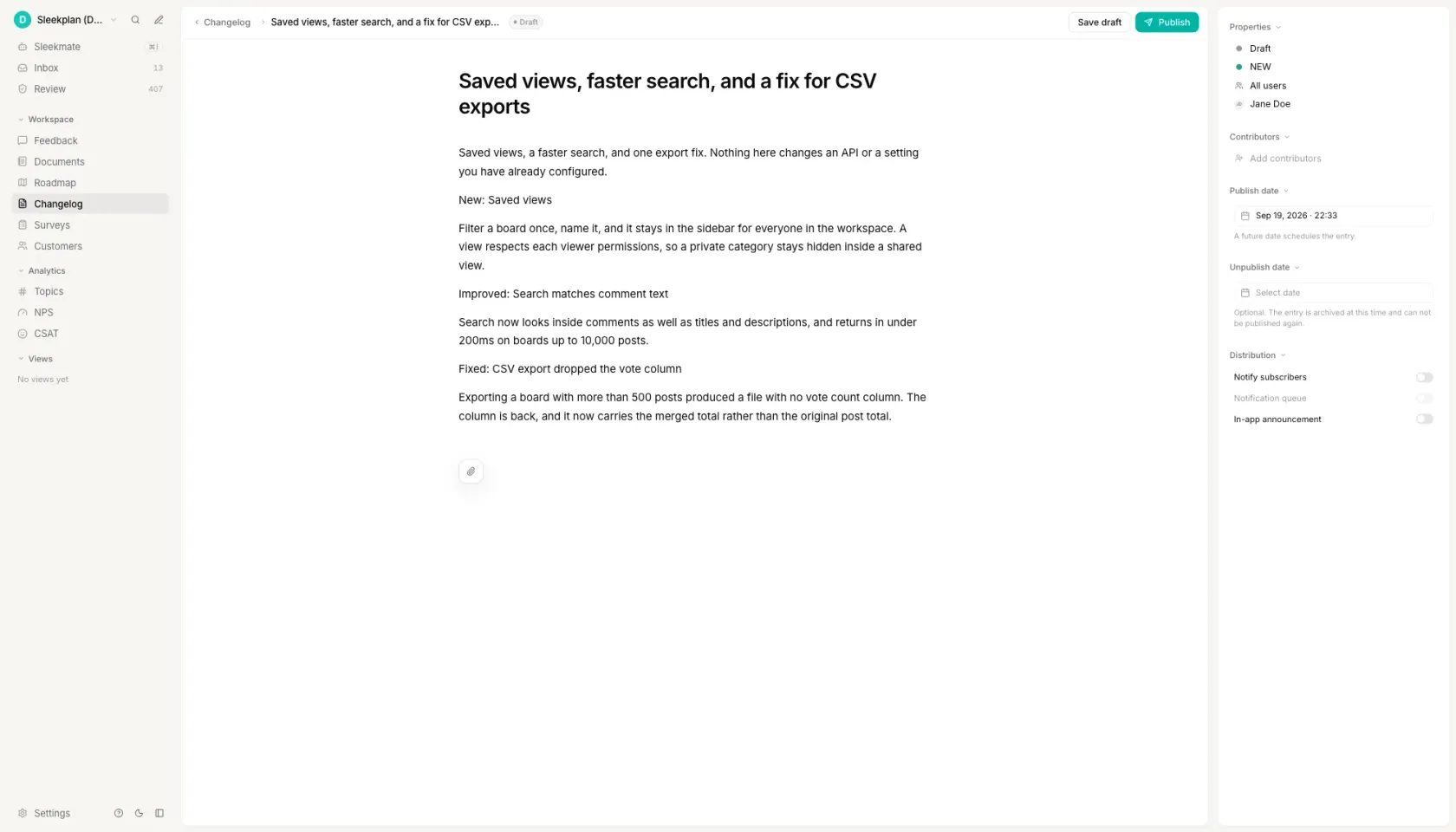
In Sleekplan a changelog entry is linked to the feedback posts it closes. Move a roadmap item to Shipped, and Sleekmate drafts the entry from the requests behind it; you edit a line and publish. Publishing notifies the people who voted, through an in-app announcement and the weekly email digest, so the loop that usually breaks, someone asks for a feature and never hears that it shipped, closes on its own.
That also fixes the reconstruction problem at its source. The entry is written against the original requests, so it speaks in the customer's words rather than in commit messages, and every claim in it is traceable back to the post that prompted it.
How to write release notes
Start from the change list, not a blank page
Pull the pull requests merged or the tickets closed since the last version. That list is the raw material, and gathering it first is what stops a release note from becoming a memory exercise two days after the deploy. Everything after this step is editing rather than recall. If a change is not on the list, it does not go in the note, and if something on the list changes nothing for a reader, it comes straight back out.
Sort every change into new, improved, fixed and removed
Four buckets is the shape nearly every convention agrees on, and Keep a Changelog splits the same idea into six by adding Deprecated and Security. Sorting first is what keeps a release note from reading as a stream of unrelated sentences. It also exposes the release that has 14 fixes and nothing new, which is worth knowing before you publish rather than after somebody asks what you have been doing.
Write the user-visible outcome, not the commit message
One sentence per change, in the present tense, naming what the reader can now do. "Dashboards with more than 20 widgets load in about 1.2 seconds" is a release note. "Refactored widget hydration" is a commit message that escaped. The test is whether someone who has never seen your codebase could tell from the sentence alone whether the change affects them.
Put breaking changes and upgrade steps at the top
A breaking change belongs above the feature list, labelled as breaking, with the date it takes effect and the exact action required. Readers scan from the top and stop early, so anything below the fold is effectively unpublished. State who is affected in one line, so the majority who are not can stop reading there rather than working it out from an endpoint name.
Say what you know is still broken
A known-issues section costs a sentence and removes the support ticket it would otherwise generate. Name the defect, who it affects, and when you expect the fix; "we are aware and working on it" is worth less than a date you might miss. The same applies to anything deprecated: give the removal date in the note that announces the deprecation, not in the one that performs it.
Questions people ask
How do you write release notes?
Start from the list of changes that shipped, sort them into new, improved, fixed and removed, then rewrite each one as the outcome a reader would recognise rather than as the work you did. Put breaking changes and required upgrade steps at the top, because readers scan from there and stop early. Expect 150 to 300 words for a standard product note and 40 to 80 for an in-app entry.
What are some good examples of release notes?
The five worked examples above are complete notes rather than empty outlines: a product release, an in-app entry, a Keep a Changelog file, an API breaking-change note and an enterprise change record, all for one fictional version so the formats can be compared directly. What makes a real one good is consistent across all five: one entry per change, the outcome named instead of the component, a number wherever one exists, and an honest line about what is still broken.
How to automatically generate release notes?
Two mechanisms do most of it without a model. If your team writes Conventional Commits, the prefixes feat, fix, perf and BREAKING CHANGE already sort every commit into buckets, and the builder on this page does that from a pasted list. The second is closing the loop from your tracker: in Sleekplan, moving a roadmap item to Shipped drafts a changelog entry from the feedback posts it closes, which is the part commit parsing cannot do because it is the part that knows who asked.
What is a good format for release notes?
A heading with the version and the date, breaking changes first, then changes grouped by kind, then the action required. For a file in a repository the six Keep a Changelog groups, Added, Changed, Deprecated, Removed, Fixed and Security, are the convention worth following because readers already know the order. For a customer-facing note, three groups are usually enough: what is new, what improved, what is fixed.
What is a software release note?
A short document published with a software version that records what changed in it and what the reader has to do. It differs from a changelog in audience and shape: a release note covers one release and is written for the people who use the product, while a changelog is a running list of every version, kept in the repository, and written for the people who integrate with it. Many teams publish both from the same change list.
Your roadmap,
on autopilot.
Free for 30 days. No card, no sales call. Cancel anytime.