Why release notes deserve better automation
Most teams treat release notes as an afterthought. Then Friday hits, the build ships, and someone scrambles to write them. Claude release notes flip that script. With Claude Skills, Claude Code, and Cowork, you can turn scattered commits and PRs into clear, human‑readable notes that publish on time, every time.
We have one simple goal: consistent, accurate release notes that reflect what actually shipped, not what we remember. Quality first, automation second.
The core idea
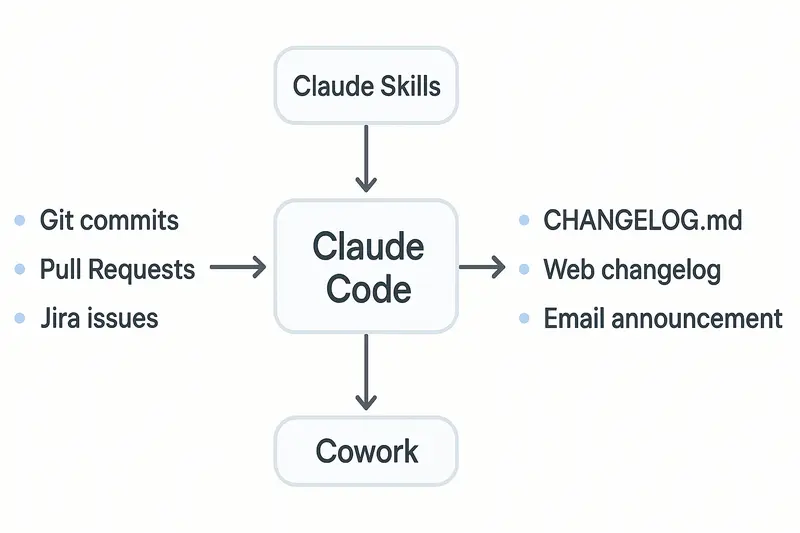
Claude is strong at narrative and synthesis, Claude Code executes multi‑step workflows, and Cowork schedules the work. Together, they pull from git, PRs, and issues, then output a clean changelog, website post, and announcement draft.
- Inputs: git history, pull requests, Jira issues
- Processing: Claude Code orchestrates, calls your Skills for rules, defers to you for review when needed
- Outputs: CHANGELOG.md, web changelog, email or in‑app announcement
Principle: automate the plumbing, keep humans on the hook for judgment.
What makes Claude different
Template engines list changes. Claude explains impact. It reads code context, commit history, and PR discussion, then writes for the right audience, from API consumers to end users. See the model’s own guidance on release notes and capabilities in the official article at support.claude.com.
- Claude’s release notes guidance: https://support.claude.com/en/articles/12138966-release-notes
- Keep a Changelog structure: https://keepachangelog.com/en/1.1.0/
- Conventional tooling that pairs well: https://github.com/semantic-release/semantic-release and https://github.com/conventional-changelog/conventional-changelog
Takeaway: structure comes from standards, voice comes from your team, execution comes from automation.
Claude Skills: teach your rules once
A Skill is a folder with a SKILL.md that encodes how your team writes release notes. Keep it short, clear, and close to reality.
What to include in SKILL.md:
- Scope: when to use the Skill, inputs it expects
- Format: sections, tone, examples
- Rules: mapping of commit types and labels to categories
- Checks: validation before final output
Helpful supporting files:
- PATTERNS.md with 3 to 5 great past releases
- CATEGORIES.md that maps Conventional Commits types to Keep a Changelog buckets
- VALIDATION.md with a preflight checklist, for example breaking changes always top, dates included, version matches tag
Principle: progressive disclosure. Claude only loads detail when it matters, which preserves context for the actual notes.
Claude Code: agentic execution that reads and runs
Claude Code lives in your terminal. It reads, writes, runs, and iterates with guardrails. For release notes, it shines when the work spans many steps.
A practical flow:
- Ask: Generate release notes for 2.1.0 since the last tag.
- Fetch: git log between tags, pull PR metadata, link issues.
- Parse: Conventional Commits, map to categories.
- Compose: create a Markdown section with Added, Changed, Fixed, Security.
- Save: write to CHANGELOG.md and a web‑ready version.
- Open PR: commit and propose for review.
We write a CLAUDE.md at the repo root to set expectations, for example we follow Keep a Changelog and Semantic Versioning, highlight breaking changes, avoid internal refactors unless they affect users.
Tip: define a simple command alias like /release 2.1.0 that kicks off the workflow without re‑explaining it.
Cowork: make it recurring, with review baked in
Cowork runs Claude as a background coworker on your machine. Schedule weekly drafts or trigger on new tags. It produces a draft, pings you for review, then publishes when you approve.
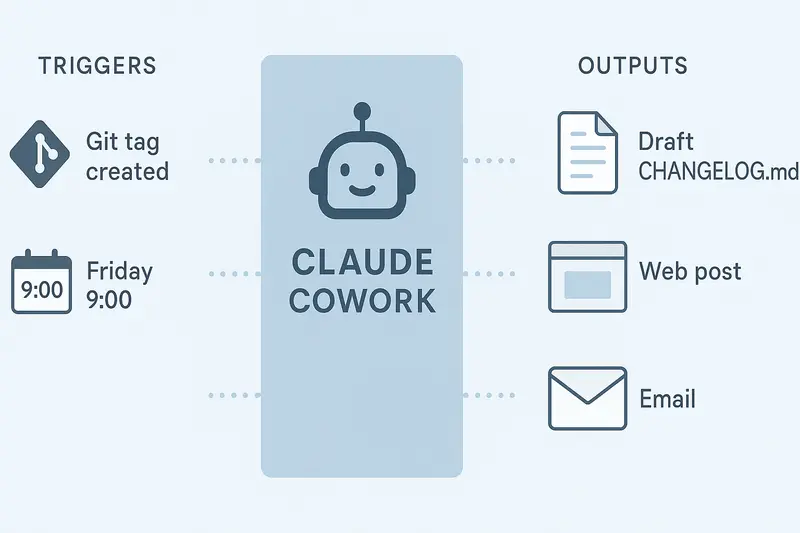
Example schedules:
- Every Friday 09:00, generate a weekly draft from merged PRs
- On tag push, prepare a versioned entry, open a PR, wait for approval
Principle: ship on time, never blindly.
Structure that works: Keep a Changelog + SemVer
Release notes that scale follow a stable frame.
- Keep a Changelog: sections for Added, Changed, Deprecated, Removed, Fixed, Security. Latest first. Publication date included.
- Semantic Versioning: major for breaking changes, minor for new features, patch for fixes. The version tells readers what to expect.
- Conventional Commits:
feat:,fix:,perf:,docs:map cleanly to categories.
Claude can combine these signals and still write like a human. Use clear impact statements, for example Users can now save dashboard presets, not Implemented IndexedDB persistence.
Setup checklist
- Create SKILL.md with format, mapping, validation
- Add PATTERNS.md with 3 exemplar releases
- Write CLAUDE.md that documents your philosophy and style
- Define a /release command for Claude Code
- Configure Cowork schedule and approval stops
- Adopt Conventional Commits in your repos
- Connect CI to auto‑open a release notes PR
Useful docs:
- GitHub auto notes config: https://docs.github.com/en/repositories/releasing-projects-on-github/automatically-generated-release-notes
- semantic-release for automated versioning: https://github.com/semantic-release/semantic-release
Example outputs that respect both humans and machines
- CHANGELOG.md for your repo history
- Web changelog post for customers
- Short in‑app announcement and email summary
If you use Sleekplan to communicate updates, publish to your public changelog and in‑app widget so customers see changes where they work. Try the changelog feature. You can also map larger upgrades to a public roadmap item at the roadmap and close the loop with feedback.
Advanced patterns we like
- Multi‑stage review: Claude drafts, PM edits, Claude applies edits, engineering signs off, then publish
- Channel fan‑out: one source of truth, multiple formats, consistent wording
- Context stacking: grow a PATTERNS.md with strong examples, and Claude improves release by release
- Monorepo rollups: component changelogs roll into a platform‑level summary with links to details
These patterns favor craft over speed, but they compound. Each iteration makes the next release cleaner.
Quality bar and evaluation
We treat release notes like code. Define tests.
- Breaking change handling: flagged at the top, with migration notes
- Ambiguous commits: ask for human clarification instead of guessing
- User‑facing filter: exclude internal refactors unless impact is explicit
- Attribution: include contributors when appropriate
- Consistency: naming, tense, punctuation
Claude can run a preflight based on VALIDATION.md, fail gracefully, and request edits.
Connect automation to product comms
Great release notes are only useful if people see them.
- Publish to your public changelog, then nudge users in‑app with a short highlight. See Changelog.
- Tie releases to roadmap progress so customers see momentum. See Roadmap.
- Route feedback from announcements back into your feedback board to inform the next cycle. Start at Feedback.
Small detail, big effect: link each note to the relevant help doc or migration guide when the change is non‑trivial.
Frequently asked questions
- What are Claude release notes? A release notes workflow powered by Claude models, Claude Code, and Cowork that turns commits and PRs into clear, versioned updates.
- How long does it take to set up? A focused team can pilot in a week, with a solid SKILL.md, CLAUDE.md, and a basic /release command.
- Do we still review? Yes. Cowork pauses for human approval before publishing. Automation prepares, humans decide.
- Do we need Conventional Commits? Strongly recommended. It makes parsing and categorization reliable.
A short example
Version: 2.1.0, 2026‑03‑31
Added
- Save dashboard presets for teams, includes role‑based defaults
Changed
- Refreshed project navigation for faster access to Updates and Roadmap
Fixed
- Resolved issue where SSO users could not edit notification rules
Security
- Bumped OpenSSL to 3.0.15, rotated staging credentials
This is the level of clarity we aim for, every time.
Final take
Automate the mechanics, protect the message. Claude handles the heavy lifting, you keep the voice. Set clear rules, keep examples close, and wire outputs straight into your changelog and product updates. The result is simple, repeatable, and genuinely helpful for users.