> ## Documentation Index
> Fetch the complete documentation index at: https://sleekplan.com/llms.txt
> Use this file to discover all available pages before exploring further.
# Question types
> Sleekplan surveys support seven question types: single choice, multiple choice, scale, NPS, CSAT, free text, and text block. Learn what each one collects, which have fixed formats, and how NPS and CSAT questions feed your analytics dashboards.
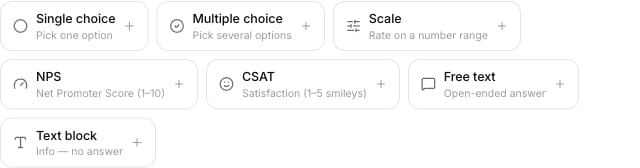
A survey is made of questions, and each question has a type that decides what it asks and how people answer it. You add a question by its type from the add-question bar in the [survey editor](/help/surveys/create-survey). There are seven types.
 ## Single choice
A list of options where the respondent picks **one**. You write the options yourself, adding and removing rows as needed. Use it for questions with mutually exclusive answers, like "Which plan are you on?"
## Multiple choice
The same as single choice, but the respondent can pick **several** options. Use it when more than one answer can be true, like "Which features do you use?"
## Scale
A numeric rating on a range you define. You set the lowest and highest number and can label each end (for example, "Not at all" to "Very much"). Use it for custom rating questions that are not a standard NPS or CSAT scale.
## NPS
A **Net Promoter Score** question on a fixed **1 to 10** scale. The format is set for you and cannot be edited, so NPS questions stay comparable across surveys and over time. Use it to measure loyalty by asking how likely someone is to recommend you.
Answers to an NPS question also feed your product-wide **NPS dashboard** at [**NPS**](https://app.sleekplan.com/nps), alongside NPS collected from popups and other sources. A survey is one of several ways to gather the same score.
## CSAT
A **customer satisfaction** question on a fixed **1 to 5 smiley** scale. Like NPS, its format is set for you and cannot be edited. Use it to measure satisfaction with your product or a specific experience.
Answers to a CSAT question also feed your product-wide **CSAT dashboard** at [**CSAT**](https://app.sleekplan.com/csat), so a survey and a CSAT popup contribute to the same satisfaction score.
## Free text
An open-ended question the respondent answers by typing. Use it to collect qualitative feedback, like "What is the main reason for your score?" Free-text answers appear as verbatims in the [results](/help/surveys/results).
## Text block
A block of text with **no answer**. It is not a question; it shows a heading, an introduction, or a note between questions. Because it collects nothing, a text block has no **Required** toggle and is left out of the results summary.
## Which types can be required
Every answerable question has a **Required** toggle that forces a respondent to answer before continuing. Only the text block, which collects no answer, has no Required toggle. See [Create a survey](/help/surveys/create-survey) for where the toggle lives.
## Next steps
Add these question types to a survey and save it.
Show a question only when an earlier answer matches.
See how each question type is summarized in the results.
Publish your survey once it has the questions you need.
## Single choice
A list of options where the respondent picks **one**. You write the options yourself, adding and removing rows as needed. Use it for questions with mutually exclusive answers, like "Which plan are you on?"
## Multiple choice
The same as single choice, but the respondent can pick **several** options. Use it when more than one answer can be true, like "Which features do you use?"
## Scale
A numeric rating on a range you define. You set the lowest and highest number and can label each end (for example, "Not at all" to "Very much"). Use it for custom rating questions that are not a standard NPS or CSAT scale.
## NPS
A **Net Promoter Score** question on a fixed **1 to 10** scale. The format is set for you and cannot be edited, so NPS questions stay comparable across surveys and over time. Use it to measure loyalty by asking how likely someone is to recommend you.
Answers to an NPS question also feed your product-wide **NPS dashboard** at [**NPS**](https://app.sleekplan.com/nps), alongside NPS collected from popups and other sources. A survey is one of several ways to gather the same score.
## CSAT
A **customer satisfaction** question on a fixed **1 to 5 smiley** scale. Like NPS, its format is set for you and cannot be edited. Use it to measure satisfaction with your product or a specific experience.
Answers to a CSAT question also feed your product-wide **CSAT dashboard** at [**CSAT**](https://app.sleekplan.com/csat), so a survey and a CSAT popup contribute to the same satisfaction score.
## Free text
An open-ended question the respondent answers by typing. Use it to collect qualitative feedback, like "What is the main reason for your score?" Free-text answers appear as verbatims in the [results](/help/surveys/results).
## Text block
A block of text with **no answer**. It is not a question; it shows a heading, an introduction, or a note between questions. Because it collects nothing, a text block has no **Required** toggle and is left out of the results summary.
## Which types can be required
Every answerable question has a **Required** toggle that forces a respondent to answer before continuing. Only the text block, which collects no answer, has no Required toggle. See [Create a survey](/help/surveys/create-survey) for where the toggle lives.
## Next steps
Add these question types to a survey and save it.
Show a question only when an earlier answer matches.
See how each question type is summarized in the results.
Publish your survey once it has the questions you need.