> ## Documentation Index
> Fetch the complete documentation index at: https://sleekplan.com/llms.txt
> Use this file to discover all available pages before exploring further.
# Reviewing AI actions
> The Review queue is where AI-proposed changes and user-submitted posts wait for a human to approve, edit or reject before they go live.
Sleek Intelligence can change your board for you: create posts, reply to users, merge duplicates, add votes and edit content. So you stay in control, those changes can wait for a person to sign off first. The **Review** queue is where they wait, alongside the normal moderation of user-submitted posts and comments.
The Review queue is available to your team from the main sidebar. AI proposals only appear here when you have turned on the matching review gate in [Sleek Intelligence settings](https://app.sleekplan.com/settings/intelligence).
## Open the queue
Click **Review** in the left sidebar. The item shows a count badge when things are waiting for you.
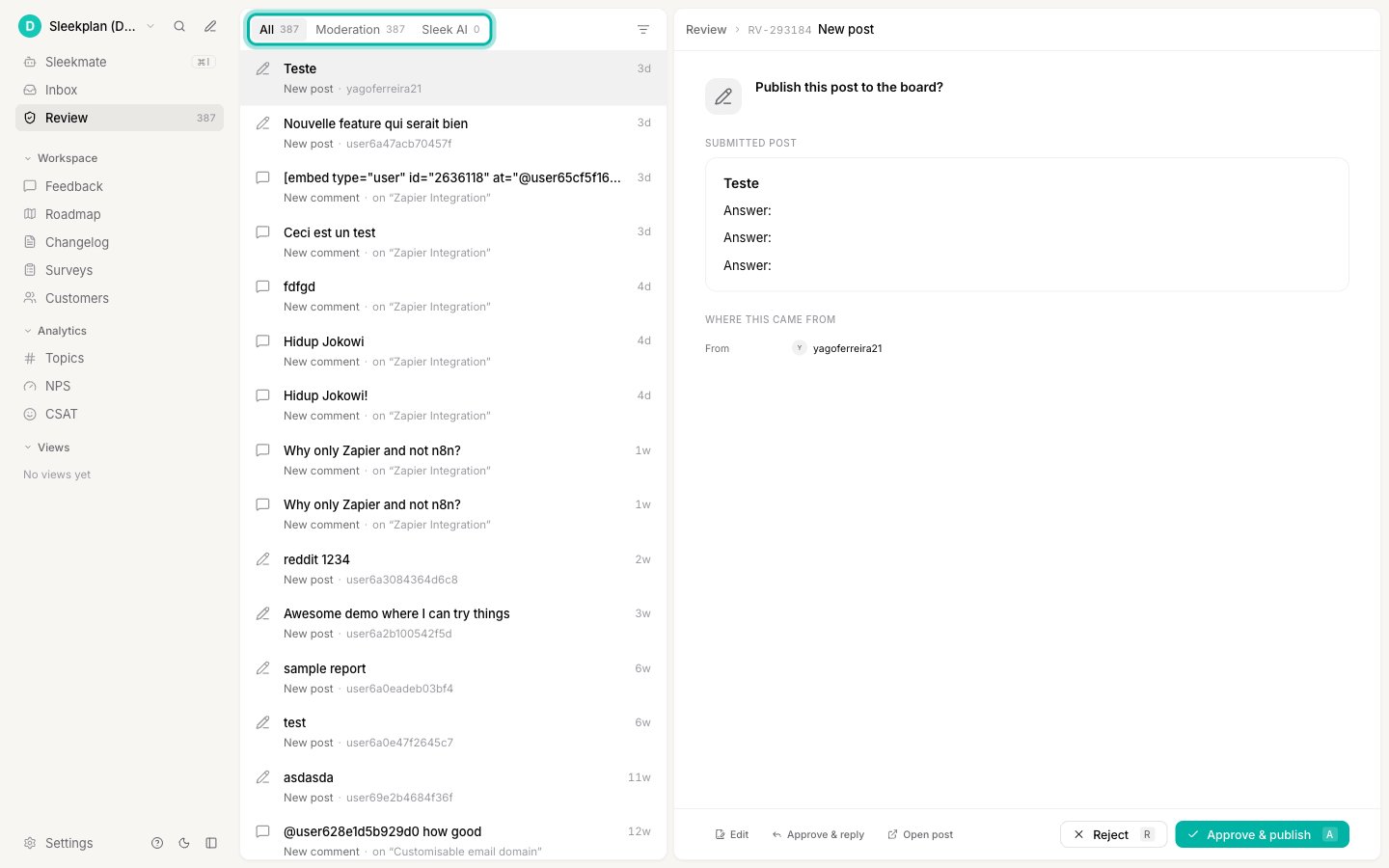 The queue has three tabs:
* **All** shows everything waiting.
* **Moderation** shows posts and comments your users submitted that need approval. Turn this on and tune it in [Moderate posts and comments](/help/portal-widget/feedback-moderation).
* **Sleek AI** shows the changes Sleek Intelligence wants to make.
## Decide what happens to each item
For every item you can **approve** it (the action runs), **reject** it (nothing happens), or **edit** it first and then approve. For user submissions you can also approve and reply to the user in one step.
The kinds of AI action you will see here:
| Action | What approving it does |
| -------------------------------- | -------------------------------------------------------------------- |
| **Create post** | Adds a new post the AI drafted, for example from an imported source. |
| **Draft reply** | Posts a comment the AI wrote in reply to a user. |
| **Merge duplicate** | Combines a post into an existing similar one. |
| **Edit post** / **Edit comment** | Applies an edit the AI suggested. |
| **Upvote** | Adds a vote on a user's behalf. |
| **Upvote + note** | Adds a vote and a private comment with context. |
Each card explains what the AI wants to do and why, so you can decide at a glance.
## Choose which actions need review
Only workspace **owners and admins** can change these settings.
Go to [**Settings → Sleek Intelligence → General**](https://app.sleekplan.com/settings/intelligence).
Turn on **Require review for AI actions**, then choose which ones need sign-off. You can gate them individually: AI-generated posts, AI merging of duplicates, AI-added votes, AI-added comments, AI-added private comments, AI-edited posts and AI-edited comments.
The queue has three tabs:
* **All** shows everything waiting.
* **Moderation** shows posts and comments your users submitted that need approval. Turn this on and tune it in [Moderate posts and comments](/help/portal-widget/feedback-moderation).
* **Sleek AI** shows the changes Sleek Intelligence wants to make.
## Decide what happens to each item
For every item you can **approve** it (the action runs), **reject** it (nothing happens), or **edit** it first and then approve. For user submissions you can also approve and reply to the user in one step.
The kinds of AI action you will see here:
| Action | What approving it does |
| -------------------------------- | -------------------------------------------------------------------- |
| **Create post** | Adds a new post the AI drafted, for example from an imported source. |
| **Draft reply** | Posts a comment the AI wrote in reply to a user. |
| **Merge duplicate** | Combines a post into an existing similar one. |
| **Edit post** / **Edit comment** | Applies an edit the AI suggested. |
| **Upvote** | Adds a vote on a user's behalf. |
| **Upvote + note** | Adds a vote and a private comment with context. |
Each card explains what the AI wants to do and why, so you can decide at a glance.
## Choose which actions need review
Only workspace **owners and admins** can change these settings.
Go to [**Settings → Sleek Intelligence → General**](https://app.sleekplan.com/settings/intelligence).
Turn on **Require review for AI actions**, then choose which ones need sign-off. You can gate them individually: AI-generated posts, AI merging of duplicates, AI-added votes, AI-added comments, AI-added private comments, AI-edited posts and AI-edited comments.
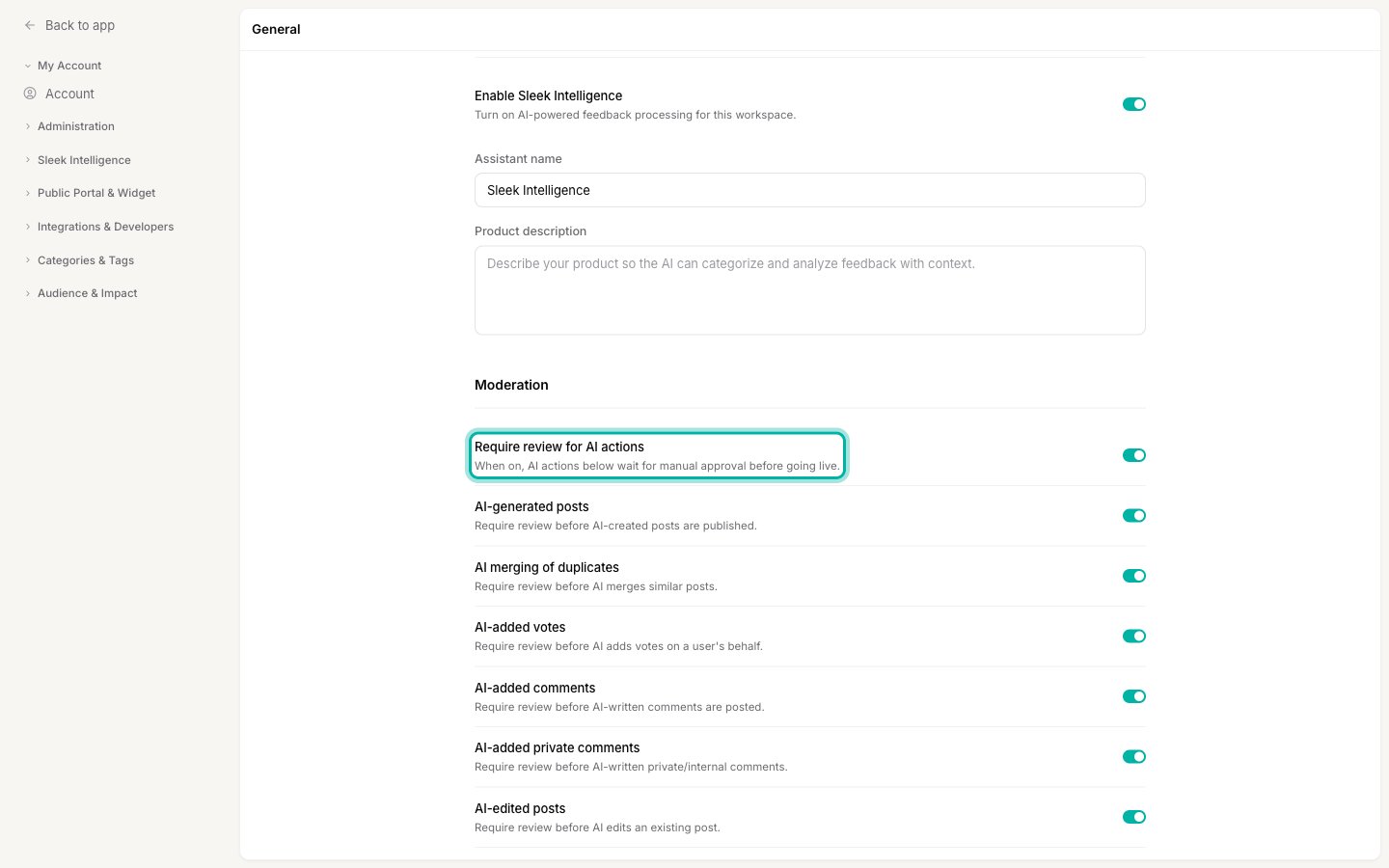 When a gate is on, that action waits in the Review queue. When it is off, the AI performs the action straight away. Labelling-only checks like sentiment analysis never change content, so they are not gated.
[Sleekmate](/help/sleek-intelligence/sleekmate), the chat assistant, has its own approval step built into the conversation, so its actions are confirmed inline rather than in this queue.
## Related
The automations whose actions land in this queue.
The assistant approves its own actions inline as you chat.
Move approved posts through your workflow.
Where AI-created posts often come from.
When a gate is on, that action waits in the Review queue. When it is off, the AI performs the action straight away. Labelling-only checks like sentiment analysis never change content, so they are not gated.
[Sleekmate](/help/sleek-intelligence/sleekmate), the chat assistant, has its own approval step built into the conversation, so its actions are confirmed inline rather than in this queue.
## Related
The automations whose actions land in this queue.
The assistant approves its own actions inline as you chat.
Move approved posts through your workflow.
Where AI-created posts often come from.