> ## Documentation Index
> Fetch the complete documentation index at: https://sleekplan.com/llms.txt
> Use this file to discover all available pages before exploring further.
# Sleek Intelligence credits
> How AI credits power Sleek Intelligence, how many each action uses, your monthly quota, and how to top up when you run low.
Sleek Intelligence credits are the fuel for every AI feature in Sleekplan. Each workspace has its own credit balance, and AI actions draw down that balance as they run. This guide explains how credits are granted, how many each action uses, and how to get more.
Sleek Intelligence requires a plan that includes AI. The free **Indie** plan has no AI credits. **Starter** and **Business** include a monthly credit quota, and trials come with a one-time grant.
## How your balance works
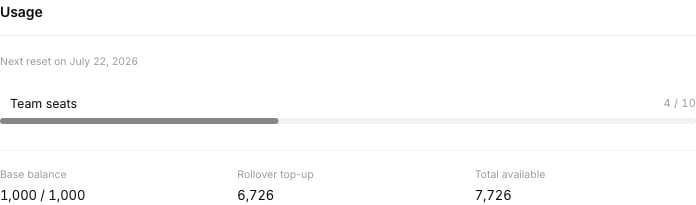
Your credit balance has two parts, both shown on the [Billing](https://app.sleekplan.com/settings/billing) screen:
* **Base balance** is your monthly plan allotment. It resets on your billing anniversary each month.
* **Rollover top-up** holds any unused base credits carried over from the previous month, plus any credits you have purchased as an [add-on](/help/account-security/add-ons).
Your **total available** is the sum of the two. When an AI action runs, it draws from your top-up balance first, then from your base balance.
Go to [**Settings → My Account → Billing**](https://app.sleekplan.com/settings/billing) and find the **Usage** section. It shows your base balance against your monthly quota, your rollover top-up, your total available, and the date of your next reset.
 ### Monthly reset and rollover
On your billing anniversary each month:
1. Whatever is left in your **base balance** is moved into your **rollover top-up**, so you do not lose it right away.
2. Your **base balance** resets to your plan's monthly quota.
In other words, base credits do not stack month after month: they reset, and the leftover is preserved once as top-up. Purchased top-up credits stay until they are used.
## Monthly quota by plan
| Plan | Monthly credits |
| ---------------- | ------------------------------------- |
| **Indie** (Free) | 0 (AI features are off) |
| **Starter** | 1,000 |
| **Business** | 5,000 |
| **Trial** | 3,000 (one-time grant while trialing) |
| **Enterprise** | Custom |
## How many credits each action uses
Most Sleek Intelligence features cost a fixed number of credits each time they run:
| Action | Credits | What it does |
| ---------------------------------- | ------- | ------------------------------------------------------------------- |
| Post summary | 10 | Summarizes a post together with its comments and merged duplicates. |
| Sentiment analysis | 10 | Detects the sentiment of incoming feedback. |
| Feedback discovery | 10 | Surfaces relevant feedback from your board. |
| Post automation | 10 | Runs automated actions on new posts. |
| Changelog automation | 10 | Runs automated actions for changelog entries. |
| Spam detection | 20 | Flags spam submissions. |
| Confidential information detection | 20 | Detects and handles confidential information in submissions. |
| Off-topic detection and follow-up | 30 | Detects off-topic content and generates a follow-up reply. |
| Duplicate detection | 50 | Finds likely duplicate posts so you can merge them. |
A single incoming post can trigger several of these at once. For example, a new post that runs duplicate detection, spam detection, confidential detection, and a follow-up would use 50 + 20 + 20 + 30 = 120 credits. If a post has already been processed, re-processing the same item does not charge again.
### Sleekmate uses a variable amount
[Sleekmate](/help/sleek-intelligence/sleekmate), the in-app AI assistant, does **not** cost a fixed number of credits per message. Its cost is variable and depends on the **effort** each request takes: how long and complex the conversation is, how many tools and specialist sub-tasks it runs, and which AI model handles the request. A quick question costs very little; a deep, multi-step task that reads a lot of feedback and drafts long output costs more.
Because the cost tracks real usage, the best way to gauge it is to watch your **total available** balance on the Billing screen before and after a heavy Sleekmate session.
## Getting more credits
* **Wait for your monthly reset.** Your base balance refills to your plan quota on your billing anniversary.
* **Top up any time.** On Starter and Business you can buy extra credits as the **Intelligence credits** [add-on](/help/account-security/add-ons), in blocks of 10,000. Purchased credits go into your rollover top-up and stay until used.
* **Upgrade your plan.** Moving from Starter to Business raises your monthly quota. See [Billing](/help/account-security/billing#upgrade-to-a-paid-plan).
## What happens when you run out
* **Automated AI features** (summaries, sentiment, duplicate and spam detection, automations) are quietly skipped when your balance is exhausted. No processing happens until you have credits again.
* **Sleekmate** stops accepting new messages and shows "Insufficient intelligence credits to send message" until you top up or your monthly quota resets.
Your balance does not refill automatically mid-cycle, so top up with the add-on if you need credits before your next reset.
## Related
What the credits power, and how to turn it on.
Top up Intelligence credits and book other add-ons.
Plans, upgrades, and where to see your usage.
Why the assistant's cost varies per message.
### Monthly reset and rollover
On your billing anniversary each month:
1. Whatever is left in your **base balance** is moved into your **rollover top-up**, so you do not lose it right away.
2. Your **base balance** resets to your plan's monthly quota.
In other words, base credits do not stack month after month: they reset, and the leftover is preserved once as top-up. Purchased top-up credits stay until they are used.
## Monthly quota by plan
| Plan | Monthly credits |
| ---------------- | ------------------------------------- |
| **Indie** (Free) | 0 (AI features are off) |
| **Starter** | 1,000 |
| **Business** | 5,000 |
| **Trial** | 3,000 (one-time grant while trialing) |
| **Enterprise** | Custom |
## How many credits each action uses
Most Sleek Intelligence features cost a fixed number of credits each time they run:
| Action | Credits | What it does |
| ---------------------------------- | ------- | ------------------------------------------------------------------- |
| Post summary | 10 | Summarizes a post together with its comments and merged duplicates. |
| Sentiment analysis | 10 | Detects the sentiment of incoming feedback. |
| Feedback discovery | 10 | Surfaces relevant feedback from your board. |
| Post automation | 10 | Runs automated actions on new posts. |
| Changelog automation | 10 | Runs automated actions for changelog entries. |
| Spam detection | 20 | Flags spam submissions. |
| Confidential information detection | 20 | Detects and handles confidential information in submissions. |
| Off-topic detection and follow-up | 30 | Detects off-topic content and generates a follow-up reply. |
| Duplicate detection | 50 | Finds likely duplicate posts so you can merge them. |
A single incoming post can trigger several of these at once. For example, a new post that runs duplicate detection, spam detection, confidential detection, and a follow-up would use 50 + 20 + 20 + 30 = 120 credits. If a post has already been processed, re-processing the same item does not charge again.
### Sleekmate uses a variable amount
[Sleekmate](/help/sleek-intelligence/sleekmate), the in-app AI assistant, does **not** cost a fixed number of credits per message. Its cost is variable and depends on the **effort** each request takes: how long and complex the conversation is, how many tools and specialist sub-tasks it runs, and which AI model handles the request. A quick question costs very little; a deep, multi-step task that reads a lot of feedback and drafts long output costs more.
Because the cost tracks real usage, the best way to gauge it is to watch your **total available** balance on the Billing screen before and after a heavy Sleekmate session.
## Getting more credits
* **Wait for your monthly reset.** Your base balance refills to your plan quota on your billing anniversary.
* **Top up any time.** On Starter and Business you can buy extra credits as the **Intelligence credits** [add-on](/help/account-security/add-ons), in blocks of 10,000. Purchased credits go into your rollover top-up and stay until used.
* **Upgrade your plan.** Moving from Starter to Business raises your monthly quota. See [Billing](/help/account-security/billing#upgrade-to-a-paid-plan).
## What happens when you run out
* **Automated AI features** (summaries, sentiment, duplicate and spam detection, automations) are quietly skipped when your balance is exhausted. No processing happens until you have credits again.
* **Sleekmate** stops accepting new messages and shows "Insufficient intelligence credits to send message" until you top up or your monthly quota resets.
Your balance does not refill automatically mid-cycle, so top up with the add-on if you need credits before your next reset.
## Related
What the credits power, and how to turn it on.
Top up Intelligence credits and book other add-ons.
Plans, upgrades, and where to see your usage.
Why the assistant's cost varies per message.