> ## Documentation Index
> Fetch the complete documentation index at: https://sleekplan.com/llms.txt
> Use this file to discover all available pages before exploring further.
# Show tags on your public board
> By default, tags are internal. Two settings on the Feedback board page make them public: let users apply tags when they submit a post, and let visitors filter the public board by tag.
[Tags](/help/feedback/tags) are internal by default: your team uses them to triage, but the people submitting feedback never see them. When you want tags to be part of the public experience, two independent settings turn them on. Both live in [**Settings → Feedback board**](https://app.sleekplan.com/settings/feedback).
These settings act on the tags you have already created. Set up the tags you want to expose first, in [**Settings → Tags**](https://app.sleekplan.com/settings/tags).
## Let users apply tags when submitting
Turn on **Let users set tags** in the **Submission & voting** section to add a tag picker to the post form. Visitors can then choose from your existing tags when they create a post, so feedback arrives already labelled.
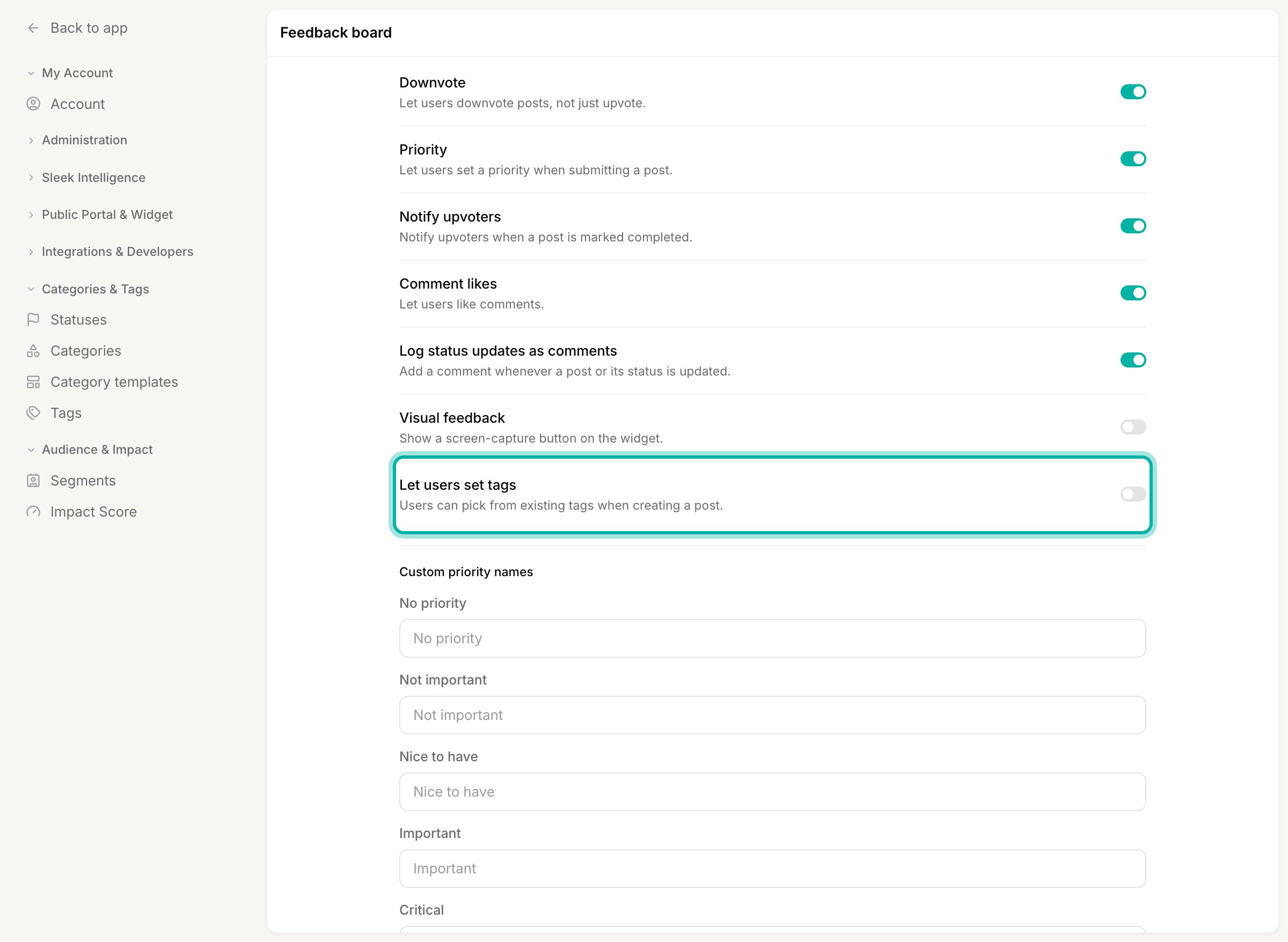 Users can only pick from the tags you have created, they cannot invent new ones. That keeps your tag list clean while still letting people self-label along an axis you care about, for example which platform they are on.
## Let visitors filter by tag
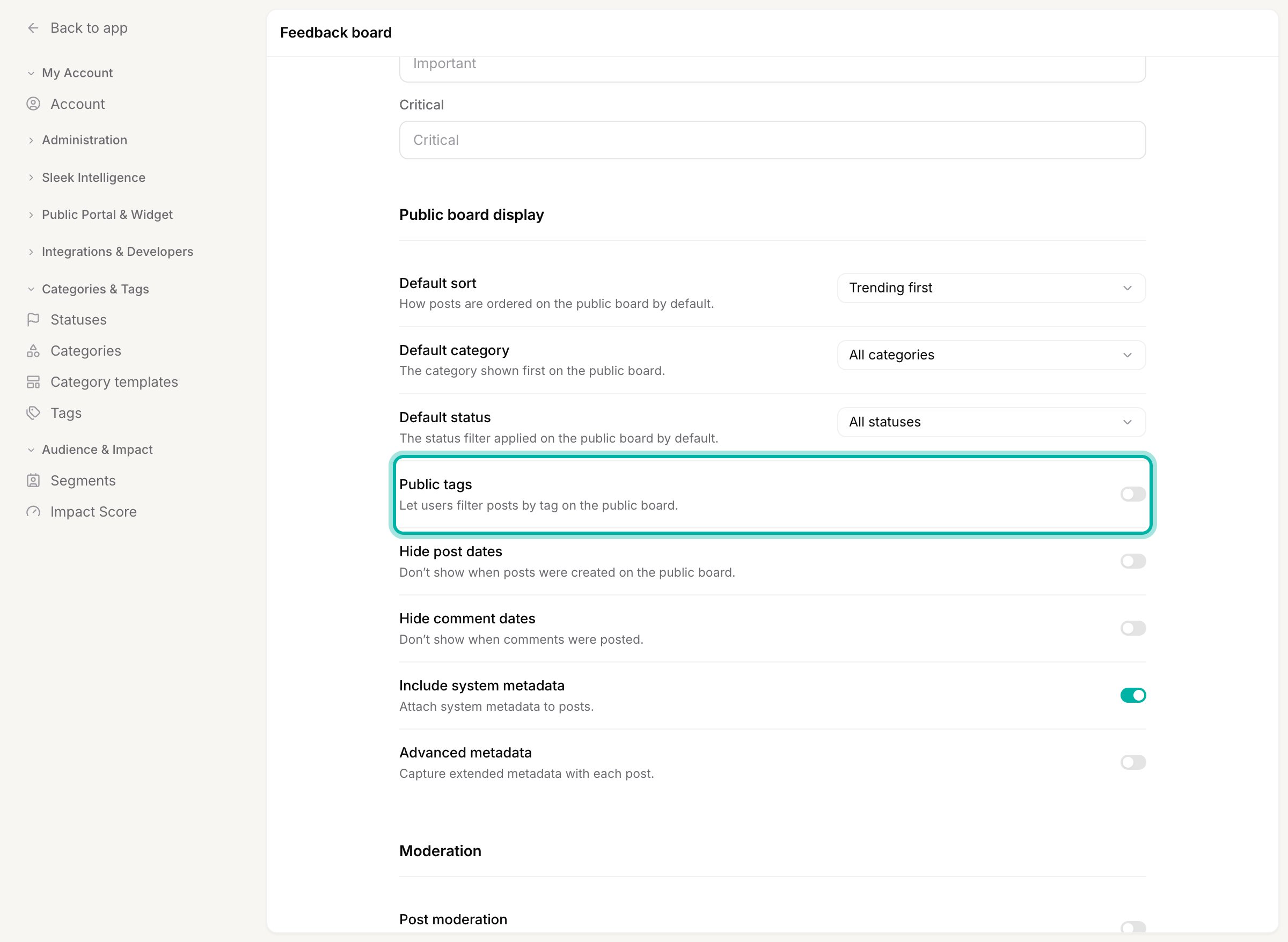
Turn on **Public tags** in the **Public board display** section to show a tag filter on your public board. Visitors can then narrow the list to a single tag and browse only the posts that carry it.
Users can only pick from the tags you have created, they cannot invent new ones. That keeps your tag list clean while still letting people self-label along an axis you care about, for example which platform they are on.
## Let visitors filter by tag
Turn on **Public tags** in the **Public board display** section to show a tag filter on your public board. Visitors can then narrow the list to a single tag and browse only the posts that carry it.
 ## Mix and match
The two settings are independent, so you can combine them however you like:
* **Both off** keeps tags fully internal. Your team still uses them as **Labels** on posts; users see nothing.
* **Public tags only** lets visitors filter by tags that you and your team apply, without letting them set tags themselves. Good when you curate the labels.
* **Let users set tags only** collects a tag on new posts but does not add a public filter.
* **Both on** gives you a fully public tag axis: users label their own posts and everyone can filter by those labels.
After changing either toggle, click **Save**.
Public tags shine as a second public axis alongside your [category](/help/feedback/categories). If your category is the kind of feedback (Feature, Bug), expose tags like Web app or iOS so visitors can filter by platform too. See [Categories vs. tags vs. statuses](/help/feedback/organizing-feedback) for how to divide the axes.
## Related
Create the tags these settings expose.
Decide which axis your users should see and filter by.
## Mix and match
The two settings are independent, so you can combine them however you like:
* **Both off** keeps tags fully internal. Your team still uses them as **Labels** on posts; users see nothing.
* **Public tags only** lets visitors filter by tags that you and your team apply, without letting them set tags themselves. Good when you curate the labels.
* **Let users set tags only** collects a tag on new posts but does not add a public filter.
* **Both on** gives you a fully public tag axis: users label their own posts and everyone can filter by those labels.
After changing either toggle, click **Save**.
Public tags shine as a second public axis alongside your [category](/help/feedback/categories). If your category is the kind of feedback (Feature, Bug), expose tags like Web app or iOS so visitors can filter by platform too. See [Categories vs. tags vs. statuses](/help/feedback/organizing-feedback) for how to divide the axes.
## Related
Create the tags these settings expose.
Decide which axis your users should see and filter by.