> ## Documentation Index
> Fetch the complete documentation index at: https://sleekplan.com/llms.txt
> Use this file to discover all available pages before exploring further.
# Public board display settings
> Set what visitors see first on your public feedback board: the default sort, category, and status filter, whether tags and dates show, and how much metadata each post carries.
The **Public board display** section controls the first impression of your public feedback board. It decides how posts are ordered, which category and status a visitor lands on, and how much surrounding detail (tags, dates, technical metadata) is shown. These defaults matter because most visitors never touch a filter: whatever you set here is what they browse.
Changing these settings requires an **Owner** or **Admin** role on the workspace.
## Open the Feedback board settings
Go to [**Settings → Public Portal & Widget → Feedback**](https://app.sleekplan.com/settings/feedback) and scroll to the **Public board display** section.
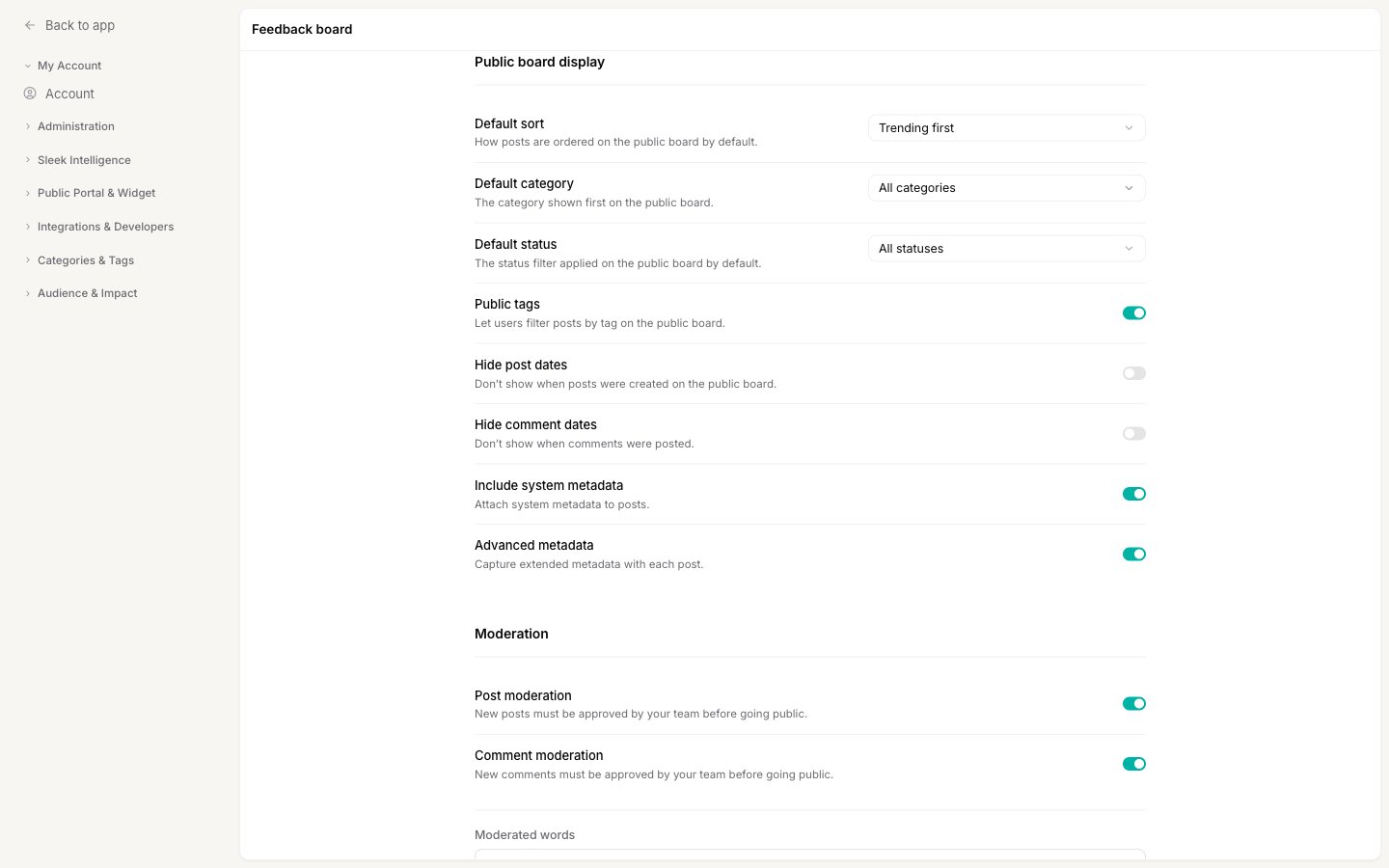 These are the starting filters and options for everyone who visits. Visitors can still change the sort or filters themselves; you are only setting where they begin. After changing anything, click **Save**.
## Default sort
**Default sort** sets the order posts appear in before a visitor changes it. Choose one of:
* **Trending first** leads with posts gaining momentum right now, which keeps the board feeling active and current.
* **Top voted first** leads with the most-wanted requests overall, which is best when you want visitors to rally behind the biggest ideas.
* **Newest first** leads with the latest submissions, which suits a board where freshness matters more than popularity.
For how visitors sort and filter once they are on the board, see [Filter and sort feedback](/help/feedback/filters).
## Default category
**Default category** sets which [category](/help/feedback/categories) is selected when the board loads. Leave it on **All categories** to show everything, or pick a single category to open the board focused on one kind of feedback (for example, showing only feature requests first).
## Default status
**Default status** sets which [status](/help/feedback/statuses) filter is applied when the board loads. Alongside your own statuses you can choose:
* **All statuses** shows every post regardless of status.
* **All (not completed / closed)** hides finished work so visitors see only what is still open, which keeps the board focused on live requests.
## Public tags
**Public tags** shows a tag filter on your board so visitors can narrow posts to a single [tag](/help/feedback/tags). This is one half of making tags public; the other is letting users apply tags themselves. Both are covered in [Show tags on your public board](/help/portal-widget/public-tags).
## Hide post dates and comment dates
Two independent toggles control whether timestamps appear:
* **Hide post dates** stops the board from showing when each post was created.
* **Hide comment dates** stops comments from showing when they were posted.
Hide dates when older feedback would otherwise look stale, for example on a board that has been running for years but where the requests are still perfectly relevant. Leave them on when recency is a useful signal for your visitors.
## Post metadata
Two toggles decide how much context Sleekplan captures with each new post and attaches to it for your team. This information helps you understand where feedback came from, without asking the user to describe their setup.
* **Include system metadata** captures the submitter's environment: their browser and operating system, language, screen size, and the page they came from.
* **Advanced metadata** adds the exact page context where the feedback was submitted, such as the full URL, path, and window size.
Advanced metadata is captured from the embedded widget on your site, where it can read the surrounding page. Both toggles apply to new posts only, not to edits of existing ones.
## Related
Control downvotes, priority, comment likes, and screen captures.
Hold new submissions for approval before they go public.
Decide which axes your visitors should browse and filter by.
How visitors reorder and narrow the board once they are on it.
These are the starting filters and options for everyone who visits. Visitors can still change the sort or filters themselves; you are only setting where they begin. After changing anything, click **Save**.
## Default sort
**Default sort** sets the order posts appear in before a visitor changes it. Choose one of:
* **Trending first** leads with posts gaining momentum right now, which keeps the board feeling active and current.
* **Top voted first** leads with the most-wanted requests overall, which is best when you want visitors to rally behind the biggest ideas.
* **Newest first** leads with the latest submissions, which suits a board where freshness matters more than popularity.
For how visitors sort and filter once they are on the board, see [Filter and sort feedback](/help/feedback/filters).
## Default category
**Default category** sets which [category](/help/feedback/categories) is selected when the board loads. Leave it on **All categories** to show everything, or pick a single category to open the board focused on one kind of feedback (for example, showing only feature requests first).
## Default status
**Default status** sets which [status](/help/feedback/statuses) filter is applied when the board loads. Alongside your own statuses you can choose:
* **All statuses** shows every post regardless of status.
* **All (not completed / closed)** hides finished work so visitors see only what is still open, which keeps the board focused on live requests.
## Public tags
**Public tags** shows a tag filter on your board so visitors can narrow posts to a single [tag](/help/feedback/tags). This is one half of making tags public; the other is letting users apply tags themselves. Both are covered in [Show tags on your public board](/help/portal-widget/public-tags).
## Hide post dates and comment dates
Two independent toggles control whether timestamps appear:
* **Hide post dates** stops the board from showing when each post was created.
* **Hide comment dates** stops comments from showing when they were posted.
Hide dates when older feedback would otherwise look stale, for example on a board that has been running for years but where the requests are still perfectly relevant. Leave them on when recency is a useful signal for your visitors.
## Post metadata
Two toggles decide how much context Sleekplan captures with each new post and attaches to it for your team. This information helps you understand where feedback came from, without asking the user to describe their setup.
* **Include system metadata** captures the submitter's environment: their browser and operating system, language, screen size, and the page they came from.
* **Advanced metadata** adds the exact page context where the feedback was submitted, such as the full URL, path, and window size.
Advanced metadata is captured from the embedded widget on your site, where it can read the surrounding page. Both toggles apply to new posts only, not to edits of existing ones.
## Related
Control downvotes, priority, comment likes, and screen captures.
Hold new submissions for approval before they go public.
Decide which axes your visitors should browse and filter by.
How visitors reorder and narrow the board once they are on it.