> ## Documentation Index
> Fetch the complete documentation index at: https://sleekplan.com/llms.txt
> Use this file to discover all available pages before exploring further.
# Internal statuses
> Mark a status internal so only your team sees it. Every public surface shows a public reference status in its place, so you can track work in detail without changing what you promise your customers.
An **internal status** is a stage only your team can see. To everyone outside your workspace, a post sitting in one looks exactly as if it were in the **public status** you nominate for it. Your team sees `In Review`, your customers see `In Progress`.
That gives you room to be precise internally without turning every internal step into a public promise.
Creating statuses requires the **Starter** plan or above. See [Plans and billing](/help/account-security/billing). Only workspace **owners** and **admins** can change status settings. See [Roles and permissions](/help/account-security/roles-permissions).
## When to use one
A public status is a promise to the person who asked. Every extra one you add is another state your customers have to interpret, so the public list works best kept short and moving in one direction.
Internal statuses let you keep that list short while tracking what actually happens. Good candidates are stages that all mean the same thing to a customer:
* **In Review**, **Needs Investigation**, **Waiting on Design**, **Ready for QA**. All of these say "we are working on it" to the person who submitted the request.
* Stages that only make sense to your team, like a handoff between two groups.
If a stage genuinely changes what you are promising, make it a public status instead. Internal statuses are for detail your customers do not need.
## How the public status works
Every internal status nominates exactly one public status to stand in for it. Sleekplan then substitutes that reference on every surface your customers can reach:
| Where | What your customers see |
| ----------------------------------------------------- | ---------------------------------------------------------------------------- |
| The post on your board | The public status, with its name and color |
| Board filters | The post appears under the **public** status filter, so it is still findable |
| The [roadmap](/help/roadmap) | The public status's column, if that status is set to show on the roadmap |
| The post's activity timeline | An entry only when the public status actually changes |
| [Status update emails](/help/account-security/emails) | The public status name |
The substitution is worked out fresh every time, so there is nothing to keep in sync and no way for the public view to drift from what you configured.
An internal status never becomes a public roadmap column, whatever its **Show on roadmap** setting says. That toggle still controls your team's roadmap in the dashboard, where you see the real statuses.
## Make a status internal
Go to [**Settings → Statuses**](https://app.sleekplan.com/settings/statuses) and click the status you want to make internal, or click **New status** to create one. See [Add, remove, and reorder statuses](/help/feedback/statuses) for the rest of the form.
Switch on **Internal only**. A **Shown publicly as** picker appears underneath.
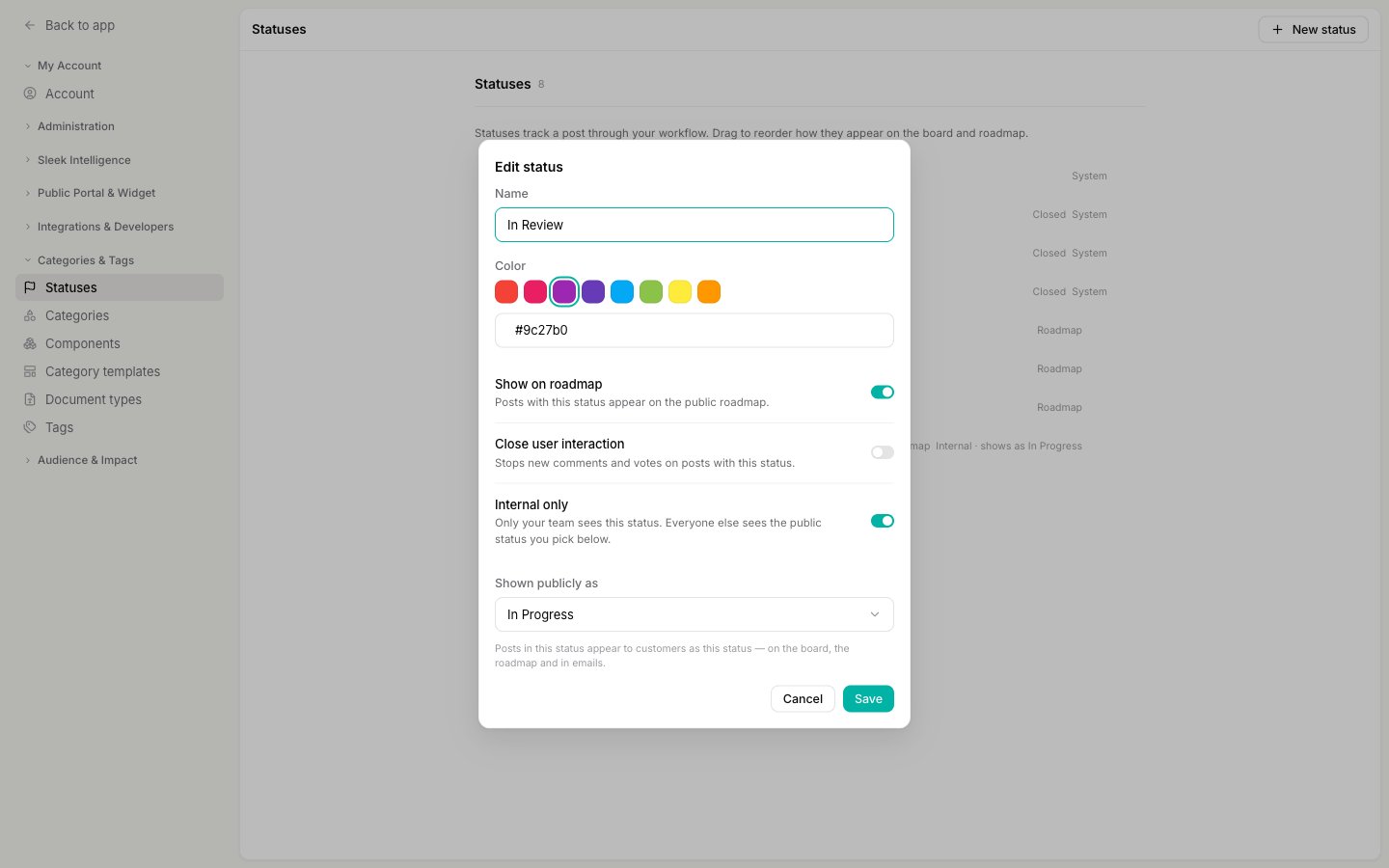 Choose the status your customers should see in its place. The picker only offers public statuses, and never the status you are editing, so you cannot accidentally point one internal status at another.
This field is required. You cannot save an internal status without it, because there would be nothing to show your customers.
Click **Save**. The change applies immediately to every post already in that status, on the board, the roadmap, and in emails from that moment on.
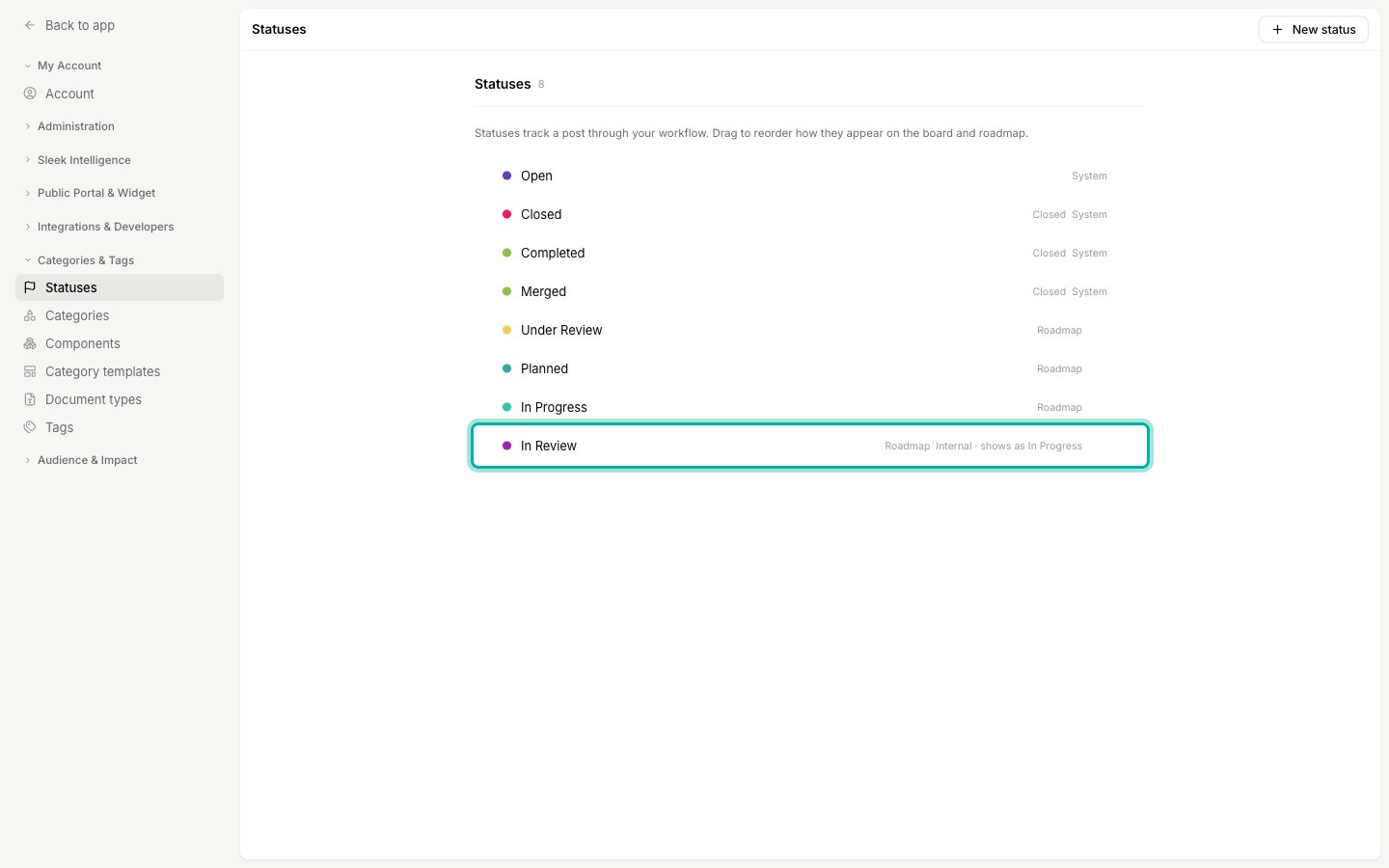
Back in the list, the status is labelled with what your customers will see instead.
Choose the status your customers should see in its place. The picker only offers public statuses, and never the status you are editing, so you cannot accidentally point one internal status at another.
This field is required. You cannot save an internal status without it, because there would be nothing to show your customers.
Click **Save**. The change applies immediately to every post already in that status, on the board, the roadmap, and in emails from that moment on.
Back in the list, the status is labelled with what your customers will see instead.
 ## What your team sees
Inside the dashboard nothing is hidden. Your team sees and sets the real status everywhere: on the board, in the [feedback filters](/help/feedback/filters), on your roadmap, and in the post's own history.
Two places give you a reminder that a status is internal:
* Opening a post shows **Publicly shown as** under its status, so you always know what the person who submitted it is looking at.
* The status filter marks internal statuses with **Internal**, so you can tell them apart when slicing the board.
## What your team sees
Inside the dashboard nothing is hidden. Your team sees and sets the real status everywhere: on the board, in the [feedback filters](/help/feedback/filters), on your roadmap, and in the post's own history.
Two places give you a reminder that a status is internal:
* Opening a post shows **Publicly shown as** under its status, so you always know what the person who submitted it is looking at.
* The status filter marks internal statuses with **Internal**, so you can tell them apart when slicing the board.
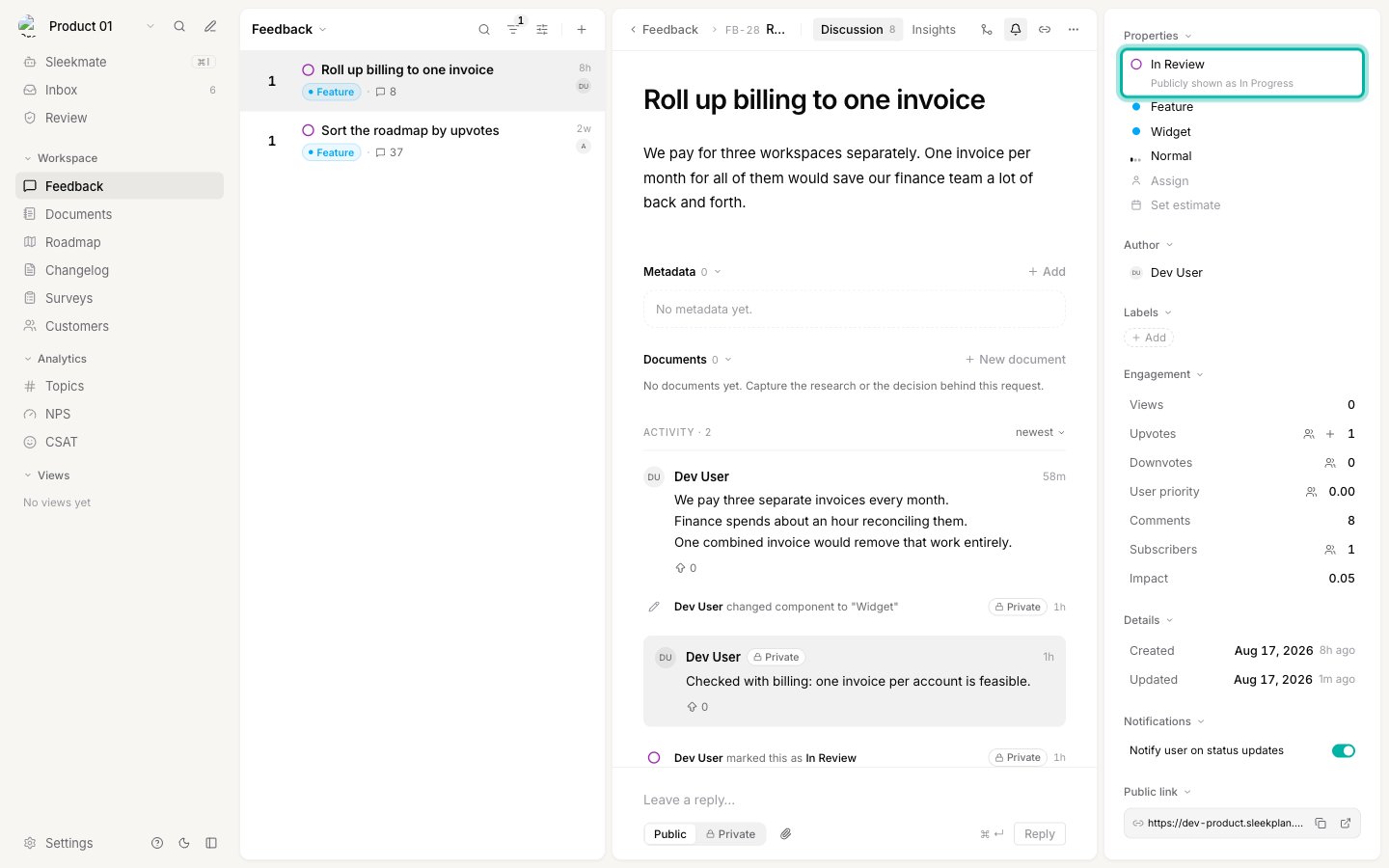 The post's activity timeline records every move, including moves between internal statuses. Those entries are added as **private** notes, visible to your team only, so your internal history stays complete while your customers see only the public changes.
Private timeline entries need the **Starter** plan or above, the same requirement as [private notes](/help/feedback/comments). On the free plan a move into an internal status is applied but not recorded on the timeline, because recording it publicly is exactly what must not happen.
## Notifications
This is the part that matters most for trust: **moving a post between internal stages never emails your customers.**
* Moving a post from one status to another that resolves to the **same** public status, for example `In Review` to `Needs Investigation`, sends **no** notification to subscribed customers. Nothing changed for them, so nothing is announced.
* Moving a post so that the **public** status does change, for example from `In Review` to `Completed`, sends the normal status update email, naming the public status.
* Teammates subscribed to the post are notified either way, with the real status, so your own people keep full visibility.
The post's **Notify user on status updates** switch still governs everything above. With it off, no status email goes out at all.
## Rules that keep it safe
A few constraints are enforced for you, so a misconfiguration can never leak an internal name to your customers.
**The four system statuses can never be internal.** **Open**, **Closed**, **Completed**, and **Merged** are tied to built-in operations, and **Open** is the last-resort status every public surface falls back to. The **Internal only** toggle is simply not offered on them.
**A public reference must itself be public.** You cannot point one internal status at another, so there are no chains to follow and no way to end up with a public view that is still internal.
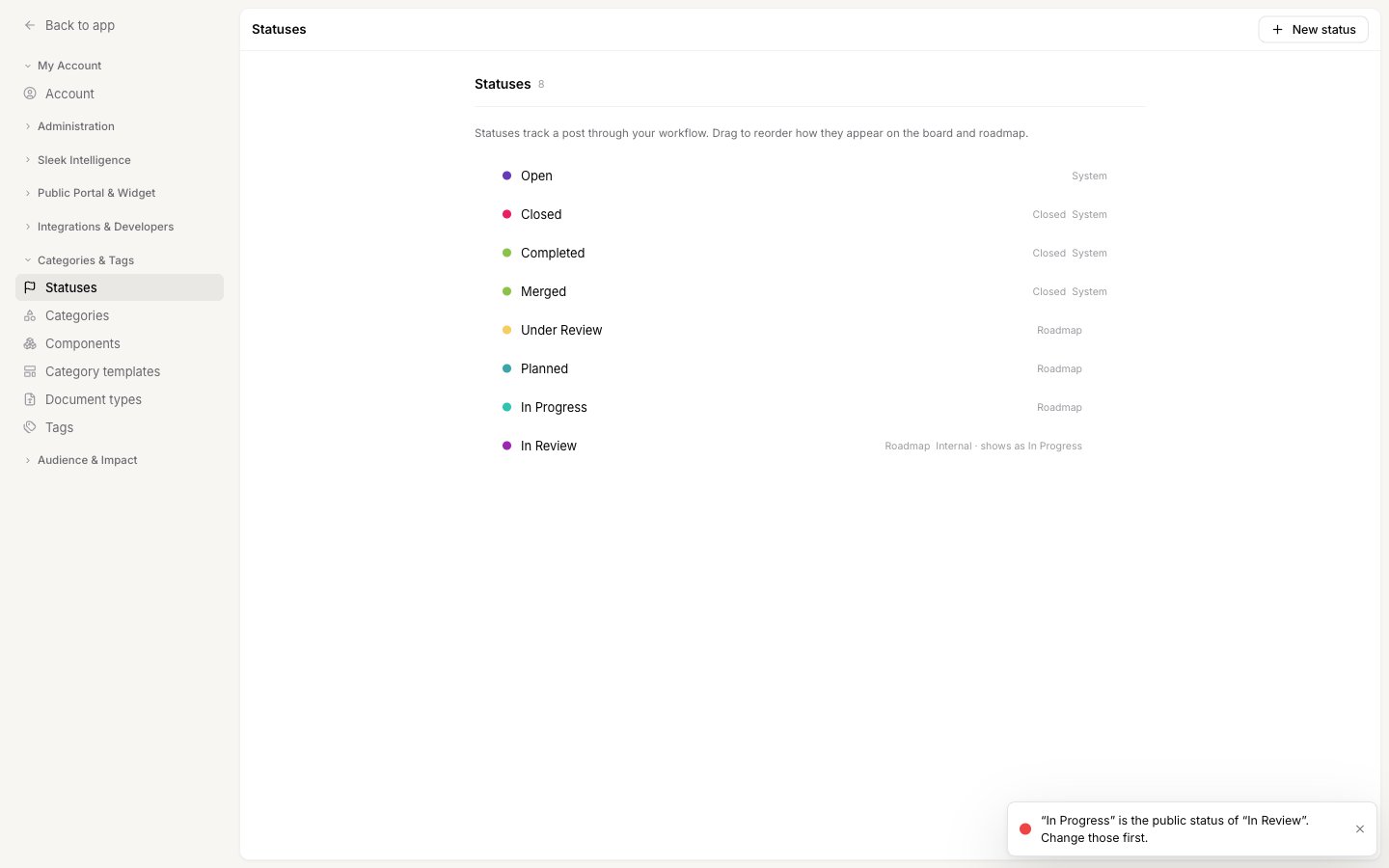
**You cannot delete a status another status points at.** Sleekplan tells you which ones depend on it so you can repoint them first.
The post's activity timeline records every move, including moves between internal statuses. Those entries are added as **private** notes, visible to your team only, so your internal history stays complete while your customers see only the public changes.
Private timeline entries need the **Starter** plan or above, the same requirement as [private notes](/help/feedback/comments). On the free plan a move into an internal status is applied but not recorded on the timeline, because recording it publicly is exactly what must not happen.
## Notifications
This is the part that matters most for trust: **moving a post between internal stages never emails your customers.**
* Moving a post from one status to another that resolves to the **same** public status, for example `In Review` to `Needs Investigation`, sends **no** notification to subscribed customers. Nothing changed for them, so nothing is announced.
* Moving a post so that the **public** status does change, for example from `In Review` to `Completed`, sends the normal status update email, naming the public status.
* Teammates subscribed to the post are notified either way, with the real status, so your own people keep full visibility.
The post's **Notify user on status updates** switch still governs everything above. With it off, no status email goes out at all.
## Rules that keep it safe
A few constraints are enforced for you, so a misconfiguration can never leak an internal name to your customers.
**The four system statuses can never be internal.** **Open**, **Closed**, **Completed**, and **Merged** are tied to built-in operations, and **Open** is the last-resort status every public surface falls back to. The **Internal only** toggle is simply not offered on them.
**A public reference must itself be public.** You cannot point one internal status at another, so there are no chains to follow and no way to end up with a public view that is still internal.
**You cannot delete a status another status points at.** Sleekplan tells you which ones depend on it so you can repoint them first.
 **If a reference ever goes missing, posts fall back to Open.** This is a safety net rather than something you should plan around. Your customers see a valid public status, never the internal one.
## Turn it off again
Edit the status and switch **Internal only** off. The status keeps its name, color, and every post in it, and becomes visible to your customers straight away, including on posts that were already in it. The **Shown publicly as** setting is dropped, since it no longer applies.
Private timeline entries recorded while the status was internal stay private. Turning the toggle off changes what your customers see from that point on, it does not republish your team's past internal notes.
## Related
Create the statuses this setting applies to.
Which axis belongs where, and why status should stay a short line of progress.
The private track your internal status moves are recorded on.
Exactly who is notified when a status changes.
**If a reference ever goes missing, posts fall back to Open.** This is a safety net rather than something you should plan around. Your customers see a valid public status, never the internal one.
## Turn it off again
Edit the status and switch **Internal only** off. The status keeps its name, color, and every post in it, and becomes visible to your customers straight away, including on posts that were already in it. The **Shown publicly as** setting is dropped, since it no longer applies.
Private timeline entries recorded while the status was internal stay private. Turning the toggle off changes what your customers see from that point on, it does not republish your team's past internal notes.
## Related
Create the statuses this setting applies to.
Which axis belongs where, and why status should stay a short line of progress.
The private track your internal status moves are recorded on.
Exactly who is notified when a status changes.