> ## Documentation Index
> Fetch the complete documentation index at: https://sleekplan.com/llms.txt
> Use this file to discover all available pages before exploring further.
# Impact Score
> Rank feedback by real impact instead of raw vote counts, and tune the weights so the score reflects how your team actually prioritizes.
The **Impact Score** is a single number Sleekplan calculates for every feedback post. It answers a question a vote count cannot: not "how many people asked for this", but "how much does building this actually matter". It combines how badly people want the post, who those people are, how much discussion it generated, how happy those customers are, and how fresh the conversation is.
The score is internal. Your end users never see it on the widget or public portal, so you can weight your most valuable customers heavily without anyone on your board noticing.
The Impact Score is calculated on the **Starter** plan and above. Changing the weights and limits requires the **Business** plan or above. See [Plans and billing](/help/account-security/billing). Only workspace **owners** and **admins** can open the Impact Score settings. See [Roles and permissions](/help/account-security/roles-permissions).
## Why a score beats a vote count
A vote count is a popularity contest. It treats every voter the same, rewards whoever shouted first, and never fades. That produces three familiar problems:
* **Your biggest customer counts once.** One vote from the account paying you the most looks identical to one vote from a free trial that churned last year.
* **"Nice to have" looks like "we will churn without this".** A vote records that someone wants it, never how badly.
* **Old posts stay on top forever.** A request that peaked three years ago outranks something the market is asking for today, because votes only ever accumulate.
The Impact Score fixes all three. Votes are still part of it, but they sit alongside the priority people attached to their vote, the weight you assigned to those specific customers, the depth of discussion on the post, the satisfaction scores of the people involved, and how recently the post saw activity. With the right weights, a post with 40 votes from weighted enterprise customers who all marked it **Critical** can comfortably outrank a post with 200 casual votes.
Because every part is a lever you control, the score is not our opinion of your roadmap. It is your prioritization policy, applied consistently to every post on the board.
## What goes into the score
Sleekplan tracks eight signals. Seven of them make up the base score, and recency is applied on top when the board is displayed.
| Signal | What it measures | How to feed it |
| -------------------- | ------------------------------------------------------------------------------------------------------------------------- | ----------------------------------------------------------------------------------------------------------------- |
| **Total priority** | The combined priority levels people attached to the post. Rewards posts many people flagged as urgent. | Turn on [Priority](/help/portal-widget/feedback-submission-voting#priority) so users pick a level when they vote. |
| **Average priority** | How urgent the post is per person, independent of how many voted. Lets a small but urgent group surface. | Same as above. |
| **Customer weight** | The combined vote weighting of everyone who voted, set a priority, or commented on the post. This is the main B2B lever. | Set a [vote weighting](#weight-your-most-valuable-customers) on your important customers. |
| **Company weight** | The combined value of the companies involved, counting each company once so one account cannot stack votes. | See the note below. |
| **Vote score** | Both the share of upvotes against downvotes and the overall vote volume, so a well-liked post beats a divisive one. | Votes, and [downvotes](/help/portal-widget/feedback-submission-voting) if you have them enabled. |
| **Engagement** | Comments and followers on the post. Discussion is a signal that people care beyond a click. | [Comments](/help/feedback/comments) and post subscriptions. |
| **User happiness** | The satisfaction (CSAT) and promoter (NPS) answers of the people engaged with the post, weighted by their vote weighting. | Collect CSAT and NPS from your users. |
| **Recency** | How long since the post was last updated. Old, quiet posts slowly fade so today's conversation rises. | Nothing to do, it is automatic. |
**Company weight is not active yet.** Grouping your end users into companies is not available in the dashboard today, so no post has any company value to count and this part of the score always contributes nothing. Leave both company fields at their defaults, or set **Company weight** to `0` and give that share to **Customer weight** instead.
### How recency behaves
Recency is applied when the board is read, not when the score is stored, so it is always current without waiting for a recalculation. A post loses freshness gradually and reaches zero freshness once it has gone untouched for the length of your recency window.
What counts as "touched" is the post's last-updated time, which moves when your team edits the post, when someone leaves a comment, or when tags change. Votes, priority votes, and new followers update the score itself but do not reset the freshness clock. In practice that means a slow trickle of votes will not keep an otherwise dead post permanently fresh, while a live discussion will.
## Sort and read your board by impact
Go to [**Feedback**](https://app.sleekplan.com/feedback) and click **Display** in the header.
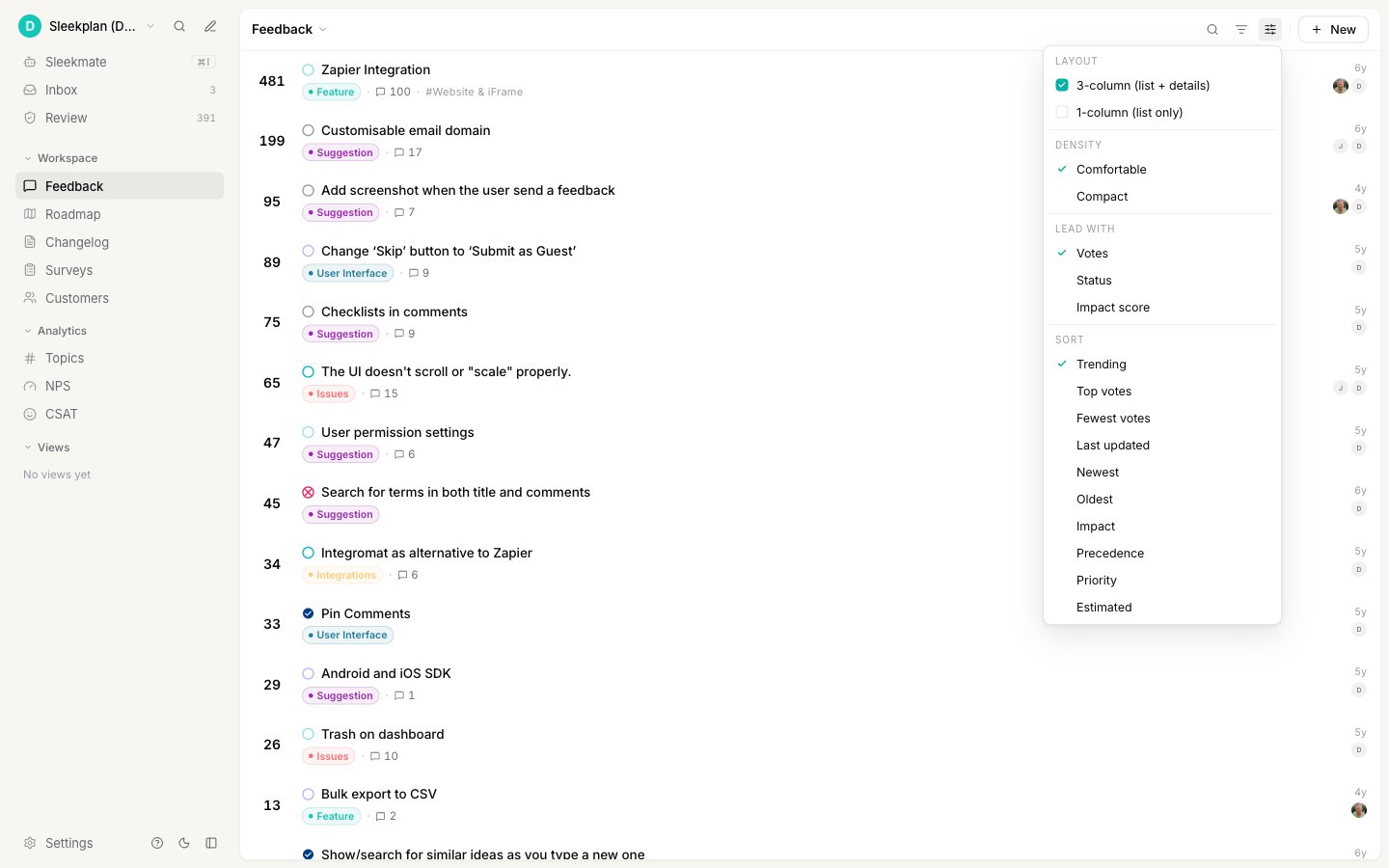 Under **Sort**, choose **Impact**. The highest-impact posts move to the top of the list.
Under **Lead with**, choose **Impact score**. Each row now leads with its score instead of its vote count, so you can compare posts at a glance. The score also appears in the details pane of any post you open.
Read the number as a ranking value, not a percentage. What matters is how posts compare to each other on your board, not the absolute figure.
Save the impact-sorted board as a [view](/help/feedback/views) and pin it to your sidebar. It becomes your standing "what should we build next" list, and it stays correct as votes and customers change without anyone maintaining it.
## Weight your most valuable customers
Vote weighting is the single highest-leverage setting, because it is what separates the Impact Score from a headcount. A customer with a weighting of 10 contributes ten times the customer weight of a default customer.
Go to [**Customers**](https://app.sleekplan.com/customers) and click the person you want to weight.
Click **Edit**, then set **Vote weighting** in the record panel. The scale runs from 1 to 10, and every customer starts at 1. Click **Save**.
Under **Sort**, choose **Impact**. The highest-impact posts move to the top of the list.
Under **Lead with**, choose **Impact score**. Each row now leads with its score instead of its vote count, so you can compare posts at a glance. The score also appears in the details pane of any post you open.
Read the number as a ranking value, not a percentage. What matters is how posts compare to each other on your board, not the absolute figure.
Save the impact-sorted board as a [view](/help/feedback/views) and pin it to your sidebar. It becomes your standing "what should we build next" list, and it stays correct as votes and customers change without anyone maintaining it.
## Weight your most valuable customers
Vote weighting is the single highest-leverage setting, because it is what separates the Impact Score from a headcount. A customer with a weighting of 10 contributes ten times the customer weight of a default customer.
Go to [**Customers**](https://app.sleekplan.com/customers) and click the person you want to weight.
Click **Edit**, then set **Vote weighting** in the record panel. The scale runs from 1 to 10, and every customer starts at 1. Click **Save**.
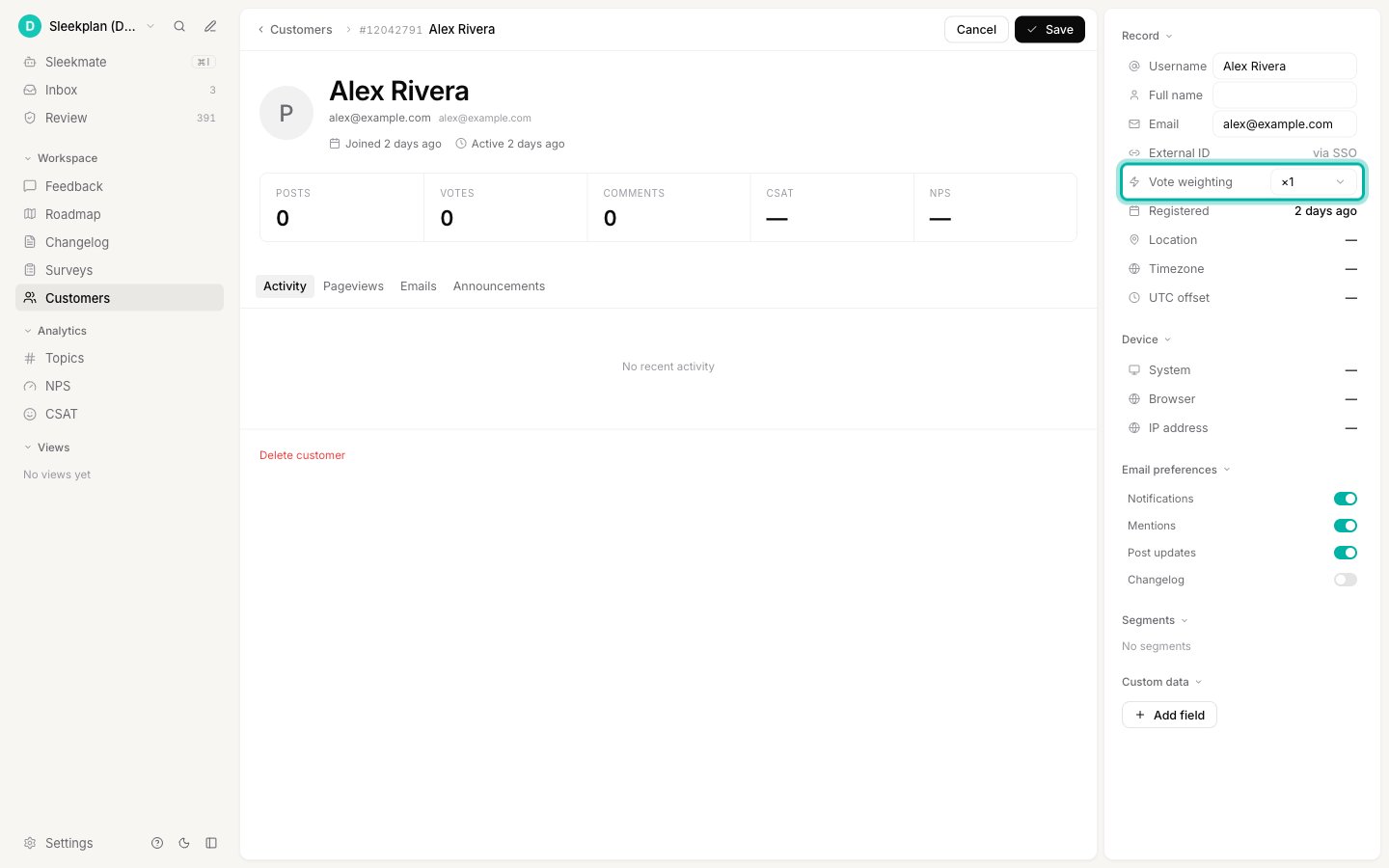 A simple scheme that works well: leave free and trial users at 1, put paying customers at 3 to 5, and reserve 8 to 10 for the handful of accounts whose renewal you would fly across the country to protect. You do not need to weight everybody. Weighting only your top accounts already changes the ranking substantially.
## Tune the weights
The defaults are a sensible general-purpose mix, but they encode a generic product team's priorities, not yours. Tuning takes a minute and changes every ranking on the board.
Go to [**Settings → Audience & Impact → Impact Score**](https://app.sleekplan.com/settings/impact).
A simple scheme that works well: leave free and trial users at 1, put paying customers at 3 to 5, and reserve 8 to 10 for the handful of accounts whose renewal you would fly across the country to protect. You do not need to weight everybody. Weighting only your top accounts already changes the ranking substantially.
## Tune the weights
The defaults are a sensible general-purpose mix, but they encode a generic product team's priorities, not yours. Tuning takes a minute and changes every ranking on the board.
Go to [**Settings → Audience & Impact → Impact Score**](https://app.sleekplan.com/settings/impact).
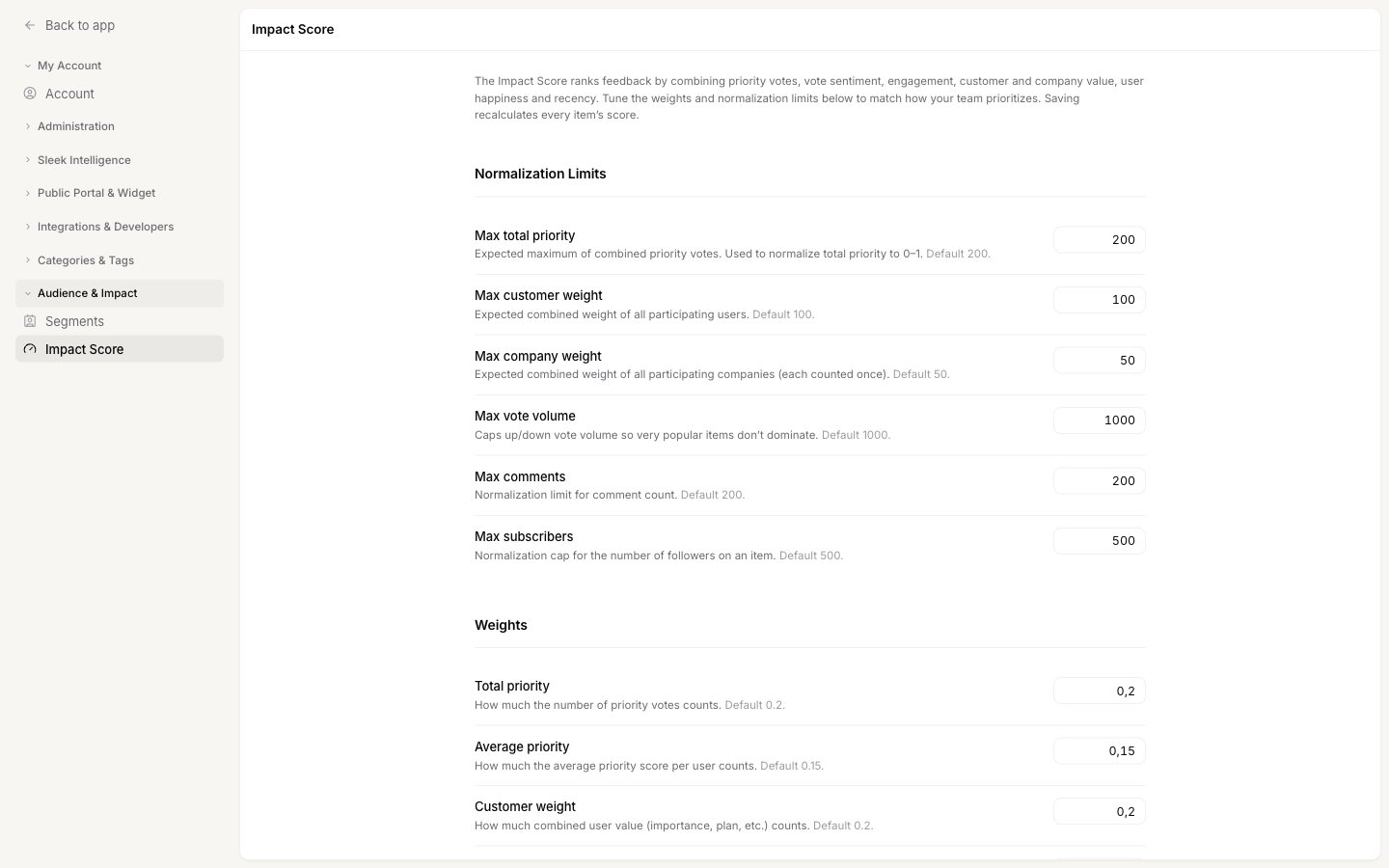 Each limit tells Sleekplan what "a lot" looks like on your board, so a post that reaches the limit gets full credit for that signal and anything beyond it does not run away with the ranking. Set each one near the highest realistic figure you would expect on a busy post: **Max total priority**, **Max customer weight**, **Max company weight**, **Max vote volume**, **Max comments**, and **Max subscribers**.
Limits set far too high flatten the score, because no post ever gets near them and every post looks similarly small. Limits set too low make many posts hit the ceiling, so the signal stops distinguishing them. Aim for a number your busiest posts approach but rarely exceed.
Each weight decides how much its signal counts. Values run from 0 to 1, where 0 switches the signal off entirely. They do not need to add up to 1, so raising one weight does not force you to lower another.
Each limit tells Sleekplan what "a lot" looks like on your board, so a post that reaches the limit gets full credit for that signal and anything beyond it does not run away with the ranking. Set each one near the highest realistic figure you would expect on a busy post: **Max total priority**, **Max customer weight**, **Max company weight**, **Max vote volume**, **Max comments**, and **Max subscribers**.
Limits set far too high flatten the score, because no post ever gets near them and every post looks similarly small. Limits set too low make many posts hit the ceiling, so the signal stops distinguishing them. Aim for a number your busiest posts approach but rarely exceed.
Each weight decides how much its signal counts. Values run from 0 to 1, where 0 switches the signal off entirely. They do not need to add up to 1, so raising one weight does not force you to lower another.
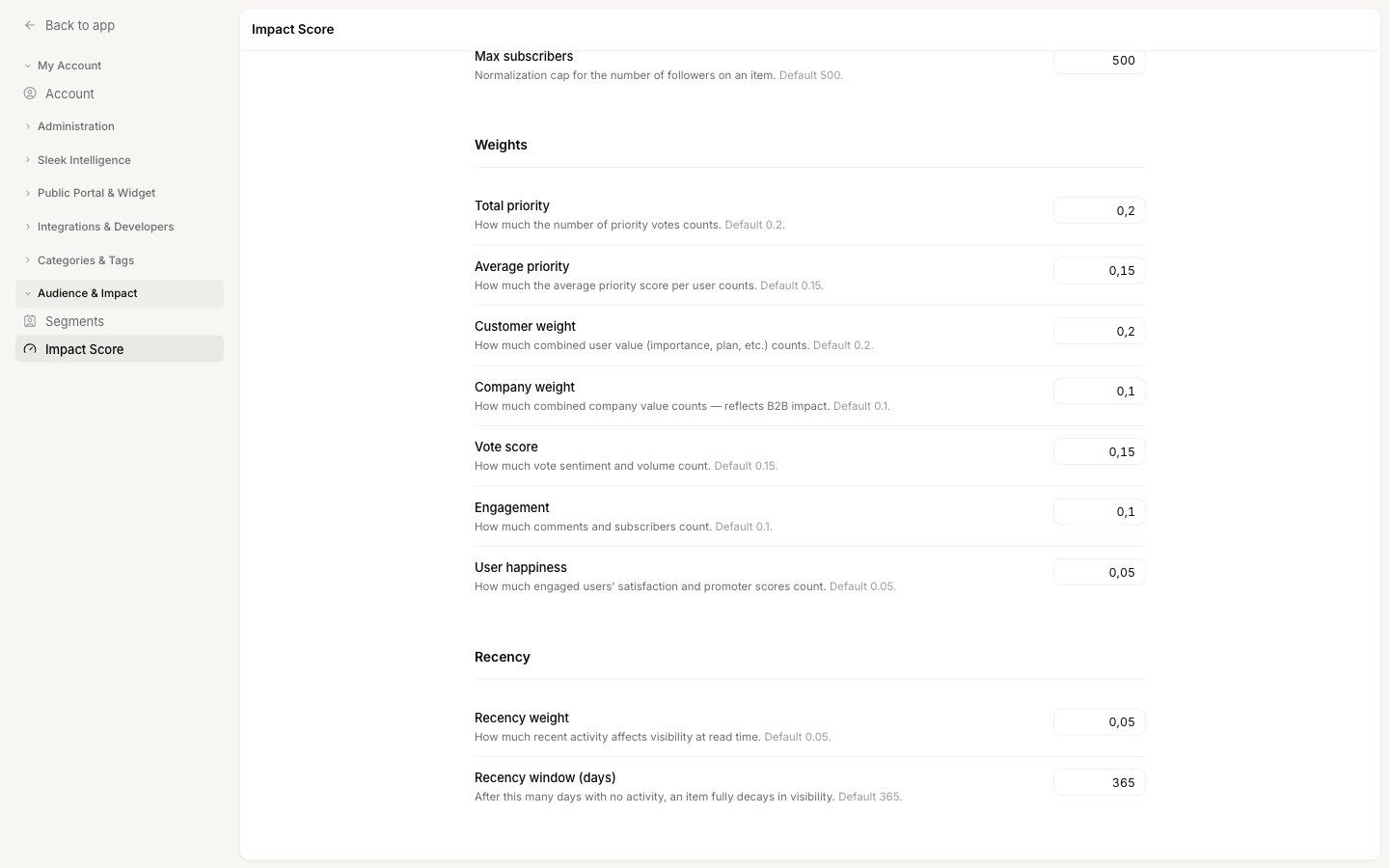 **Recency weight** decides how strongly freshness affects the ranking, and **Recency window (days)** sets how long a post takes to fully fade. A short window such as 90 days keeps the board firmly focused on the current quarter. A long window such as 730 days lets long-standing requests hold their place.
Click **Save**. Every post on the board is recalculated in the background. While that runs, a banner appears and the fields are locked, so wait for it to finish before making another change.
### Starting points
Rather than adjusting every field, pick the profile closest to your business and change only the two or three weights it names.
| If you are | Raise | Lower |
| ----------------------------------------------- | ---------------------------------------------- | ---------------------- |
| **B2B with a few large accounts** | Customer weight, average priority | Vote score, engagement |
| **Consumer or high-volume, many small users** | Vote score, engagement | Customer weight |
| **Focused on retention and churn risk** | User happiness, customer weight | Total priority |
| **Working from a fast-moving, current backlog** | Recency weight, and shorten the recency window | Total priority |
| **Running a support-heavy board** | Engagement, average priority | Vote score |
Change one thing at a time, sort by **Impact**, and look at the top twenty posts. If the order matches the conversation your team would have had in a prioritization meeting, the settings are right. If a post you know is important sits too low, look at which signal it is missing rather than raising every weight.
## Good to know
Scores recalculate in the background shortly after activity on a post: a vote, a priority vote, a comment, a new follower, or an edit by your team. Saving new settings recalculates every post at once, which takes longer on a large board. Recency is applied live every time the board loads, so freshness never waits for a recalculation.
Sorting by **Impact** hides posts whose score is exactly zero, which is normally a post that has had no votes, priorities, comments, or followers at all. Switch to another sort, or use [filters](/help/feedback/filters), to see the full board including untouched posts.
No. The score is stripped from every response the widget and the public portal receive, so there is no way for a visitor to see it or infer it. It is returned by the [REST API](https://sleekplan.com/docs/api/overview), which only your team can call with your API key.
Starter calculates the Impact Score with the default weights, but changing them requires Business or above. When you save on Starter, an upgrade prompt appears instead. See [Plans and billing](/help/account-security/billing).
[Precedence](/help/feedback/create-post#set-the-post-properties) is a manual label your team sets on a single post, so it records a decision you have already made. The Impact Score is calculated from what your customers actually did, so it helps you make that decision in the first place. Most teams sort by **Impact** to decide, then set **Precedence** to record the outcome.
Priority is off by default. Turn on [Priority](/help/portal-widget/feedback-submission-voting#priority) in your board settings so users pick a level when they vote. Until it is on, the two priority signals contribute nothing, and you should move their weight to customer weight and vote score.
## Related
Every sort and display option on the feedback board, including where Impact fits.
Turn on priority and downvotes, and rename the priority levels.
Categories, tags, and statuses to structure the board the score ranks.
How your customers exist in your workspace, and where to find them.
**Recency weight** decides how strongly freshness affects the ranking, and **Recency window (days)** sets how long a post takes to fully fade. A short window such as 90 days keeps the board firmly focused on the current quarter. A long window such as 730 days lets long-standing requests hold their place.
Click **Save**. Every post on the board is recalculated in the background. While that runs, a banner appears and the fields are locked, so wait for it to finish before making another change.
### Starting points
Rather than adjusting every field, pick the profile closest to your business and change only the two or three weights it names.
| If you are | Raise | Lower |
| ----------------------------------------------- | ---------------------------------------------- | ---------------------- |
| **B2B with a few large accounts** | Customer weight, average priority | Vote score, engagement |
| **Consumer or high-volume, many small users** | Vote score, engagement | Customer weight |
| **Focused on retention and churn risk** | User happiness, customer weight | Total priority |
| **Working from a fast-moving, current backlog** | Recency weight, and shorten the recency window | Total priority |
| **Running a support-heavy board** | Engagement, average priority | Vote score |
Change one thing at a time, sort by **Impact**, and look at the top twenty posts. If the order matches the conversation your team would have had in a prioritization meeting, the settings are right. If a post you know is important sits too low, look at which signal it is missing rather than raising every weight.
## Good to know
Scores recalculate in the background shortly after activity on a post: a vote, a priority vote, a comment, a new follower, or an edit by your team. Saving new settings recalculates every post at once, which takes longer on a large board. Recency is applied live every time the board loads, so freshness never waits for a recalculation.
Sorting by **Impact** hides posts whose score is exactly zero, which is normally a post that has had no votes, priorities, comments, or followers at all. Switch to another sort, or use [filters](/help/feedback/filters), to see the full board including untouched posts.
No. The score is stripped from every response the widget and the public portal receive, so there is no way for a visitor to see it or infer it. It is returned by the [REST API](https://sleekplan.com/docs/api/overview), which only your team can call with your API key.
Starter calculates the Impact Score with the default weights, but changing them requires Business or above. When you save on Starter, an upgrade prompt appears instead. See [Plans and billing](/help/account-security/billing).
[Precedence](/help/feedback/create-post#set-the-post-properties) is a manual label your team sets on a single post, so it records a decision you have already made. The Impact Score is calculated from what your customers actually did, so it helps you make that decision in the first place. Most teams sort by **Impact** to decide, then set **Precedence** to record the outcome.
Priority is off by default. Turn on [Priority](/help/portal-widget/feedback-submission-voting#priority) in your board settings so users pick a level when they vote. Until it is on, the two priority signals contribute nothing, and you should move their weight to customer weight and vote score.
## Related
Every sort and display option on the feedback board, including where Impact fits.
Turn on priority and downvotes, and rename the priority levels.
Categories, tags, and statuses to structure the board the score ranks.
How your customers exist in your workspace, and where to find them.