> ## Documentation Index
> Fetch the complete documentation index at: https://sleekplan.com/llms.txt
> Use this file to discover all available pages before exploring further.
# Find customers who aren't receiving your emails
> Check any customer's sending health to see whether your notification emails are actually reaching them, why a stopped address was stopped, and how to start sending again.
When a customer tells you they never got a status update or your latest changelog, the answer is on their profile. Every customer has a **Sending health** panel that shows whether Sleekplan can still deliver email to their address, and why it stopped if it did.
This matters because a rejected address is invisible otherwise. Your mail provider accepts the message, reports success, and then discards it, so the app would happily show the email as sent while nothing ever arrived. Sending health is the record of what actually happened.
Sending health appears only for customers who have a real email address. Anonymous users who voted or commented without giving one have nothing to check.
Sending health answers the question for the address as a whole. To see what happened to one particular email, open the same customer's [Emails tab](/help/account-security/email-delivery-status), which shows each notification you sent them and whether it went out, bounced, or was stopped.
## Check one customer
Go to [**Customers**](https://app.sleekplan.com/customers) and select the person who reported the problem. Their details open in the panel on the right.
Scroll the right panel to **Sending health**, just below **Email preferences**.
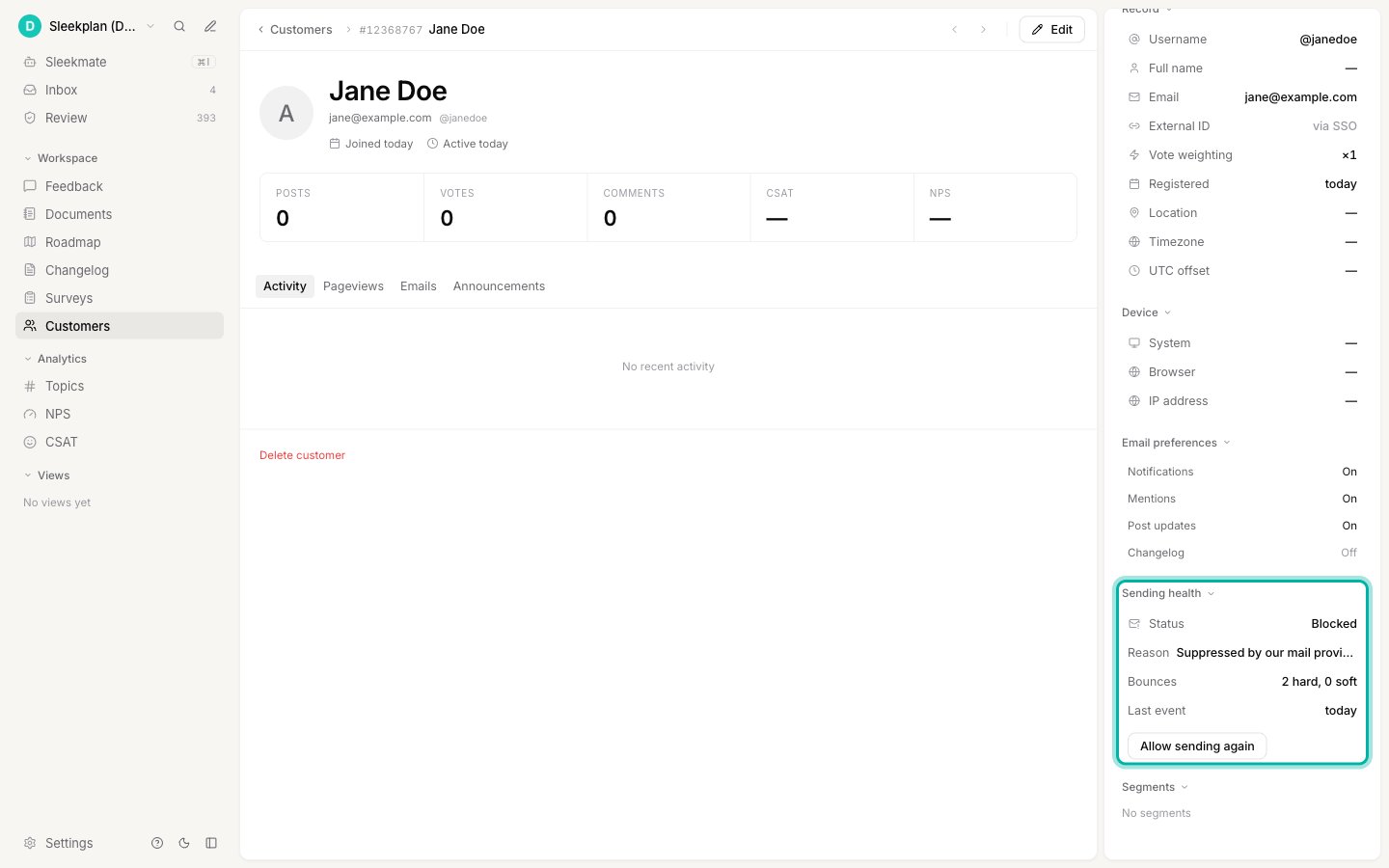 **Status** is the answer to "are we still emailing this person?" It reads one of three ways:
| Status | What it means |
| --------------- | -------------------------------------------------------------------------------------------------------------------------------- |
| **Deliverable** | Nothing is wrong. Emails are being sent to this address normally. |
| **Paused** | The address failed temporarily several times, so sending is on hold. A **Resumes** row shows the date it starts again by itself. |
| **Blocked** | The address rejected mail for good, or the person marked your email as spam. Sending stopped and will not resume on its own. |
**Reason** explains what caused it, **Bounces** counts the failures behind the decision, and **Last event** is when the most recent one happened.
## What each reason means
| Reason | What happened | What to do |
| ------------------------------------- | ---------------------------------------------------------------------------------------------------------------------- | ----------------------------------------------------------------------------- |
| **Address rejected mail permanently** | The receiving server said the mailbox does not exist. Usually a typo, or someone who left the company. | Ask the customer for a corrected address and update their profile. |
| **Suppressed by our mail provider** | The address failed before and our mail provider is refusing it outright. | Same as above. If you know the address works now, restore it (below). |
| **Repeated temporary failures** | Delivery failed several times in a row without a permanent refusal. A full mailbox or a mail server having a bad week. | Usually nothing. It resumes on the date shown. |
| **Marked as spam in this workspace** | Someone at that address marked one of your emails as spam. | Respect it. Only restore if they have asked you to start emailing them again. |
A spam complaint only stops **your** workspace. If the same person is a customer of another workspace, that workspace keeps emailing them normally. A rejected mailbox is different: a dead address is dead everywhere, so it stops for every workspace at once.
## What still gets through
A stopped address does not lock anyone out. Sleekplan only withholds **notification** emails: new comments, mentions, status updates, and [changelog updates](/help/changelog).
Sign-in codes, and anything else a person needs to actually use your board, are always sent. Someone whose notifications have stopped can still sign in, post, and vote exactly as before.
## Start sending again
If you know an address is working, for example the customer fixed a typo or confirmed their mailbox is back, you can restore it.
The button appears in the **Sending health** panel whenever a customer is paused or blocked.
**Status** is the answer to "are we still emailing this person?" It reads one of three ways:
| Status | What it means |
| --------------- | -------------------------------------------------------------------------------------------------------------------------------- |
| **Deliverable** | Nothing is wrong. Emails are being sent to this address normally. |
| **Paused** | The address failed temporarily several times, so sending is on hold. A **Resumes** row shows the date it starts again by itself. |
| **Blocked** | The address rejected mail for good, or the person marked your email as spam. Sending stopped and will not resume on its own. |
**Reason** explains what caused it, **Bounces** counts the failures behind the decision, and **Last event** is when the most recent one happened.
## What each reason means
| Reason | What happened | What to do |
| ------------------------------------- | ---------------------------------------------------------------------------------------------------------------------- | ----------------------------------------------------------------------------- |
| **Address rejected mail permanently** | The receiving server said the mailbox does not exist. Usually a typo, or someone who left the company. | Ask the customer for a corrected address and update their profile. |
| **Suppressed by our mail provider** | The address failed before and our mail provider is refusing it outright. | Same as above. If you know the address works now, restore it (below). |
| **Repeated temporary failures** | Delivery failed several times in a row without a permanent refusal. A full mailbox or a mail server having a bad week. | Usually nothing. It resumes on the date shown. |
| **Marked as spam in this workspace** | Someone at that address marked one of your emails as spam. | Respect it. Only restore if they have asked you to start emailing them again. |
A spam complaint only stops **your** workspace. If the same person is a customer of another workspace, that workspace keeps emailing them normally. A rejected mailbox is different: a dead address is dead everywhere, so it stops for every workspace at once.
## What still gets through
A stopped address does not lock anyone out. Sleekplan only withholds **notification** emails: new comments, mentions, status updates, and [changelog updates](/help/changelog).
Sign-in codes, and anything else a person needs to actually use your board, are always sent. Someone whose notifications have stopped can still sign in, post, and vote exactly as before.
## Start sending again
If you know an address is working, for example the customer fixed a typo or confirmed their mailbox is back, you can restore it.
The button appears in the **Sending health** panel whenever a customer is paused or blocked.
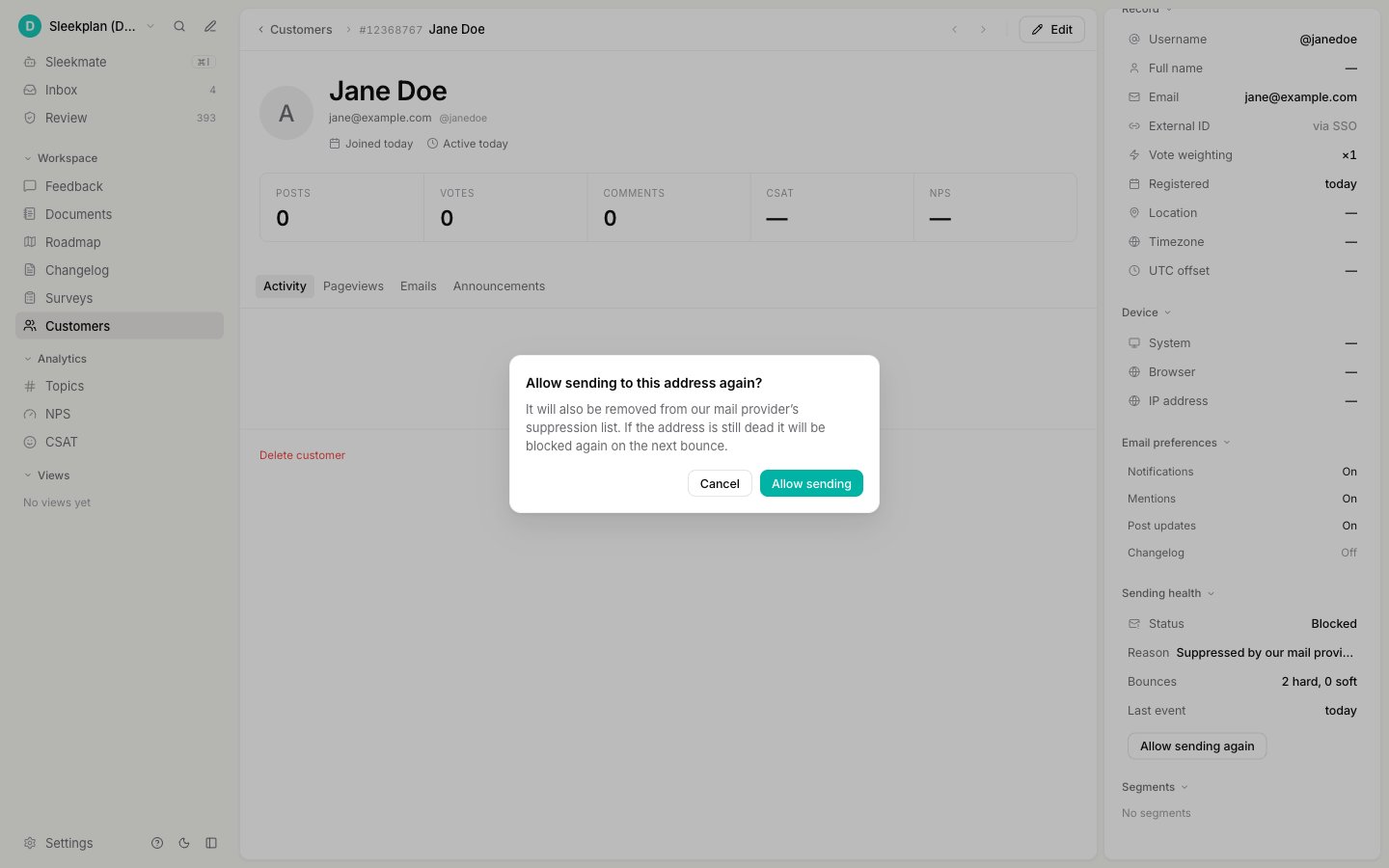 Restoring also removes the address from your mail provider's suppression list, which is what makes the next email actually go out. If the address is still dead, the next bounce stops it again, so there is no harm in trying once.
Restoring an address that genuinely does not exist will bounce again immediately. Repeatedly restoring dead addresses damages your sending reputation and can push your legitimate emails into spam folders for everyone. Only restore addresses you have a reason to believe are working.
## When it pauses and when it stops for good
You do not need to manage any of this, but it helps to know the rules:
* A permanent rejection or a spam complaint stops sending immediately, and it stays stopped until you restore it.
* Temporary failures are forgiven. It takes three inside 30 days to pause an address, and the first pause lasts 30 days. If the same address keeps failing after that, the next pauses are longer (90 days, then 180). A temporary failure never becomes permanent on its own.
## Related
Every email your users can receive, who gets each one, and how to send from your own domain.
The per-message view: every notification you sent a customer, and its outcome.
How your customers' accounts work, and why they never sign up at Sleekplan.
Restoring also removes the address from your mail provider's suppression list, which is what makes the next email actually go out. If the address is still dead, the next bounce stops it again, so there is no harm in trying once.
Restoring an address that genuinely does not exist will bounce again immediately. Repeatedly restoring dead addresses damages your sending reputation and can push your legitimate emails into spam folders for everyone. Only restore addresses you have a reason to believe are working.
## When it pauses and when it stops for good
You do not need to manage any of this, but it helps to know the rules:
* A permanent rejection or a spam complaint stops sending immediately, and it stays stopped until you restore it.
* Temporary failures are forgiven. It takes three inside 30 days to pause an address, and the first pause lasts 30 days. If the same address keeps failing after that, the next pauses are longer (90 days, then 180). A temporary failure never becomes permanent on its own.
## Related
Every email your users can receive, who gets each one, and how to send from your own domain.
The per-message view: every notification you sent a customer, and its outcome.
How your customers' accounts work, and why they never sign up at Sleekplan.